
Participant
February 27, 2017
Answered

Repeated and consistent Highlight

  • February 27, 2017
  • 3 replies
  • 9690 views

Hi,

I used to be able to highlight consistently throughout my document by double clicking on the highlighter button.

However, I am unable to do so anymore. I will now have to click on the highlighter button everytime I would like to highlight.

Is anyone having this problem too? and how can I solve this?

Thank you very much!
This topic has been closed for replies.
Correct answer arvindy

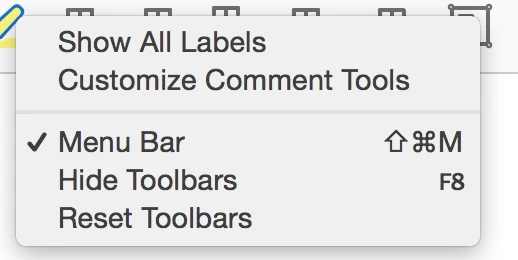
Hi, I do not have that option, I have uploaded a photo of the options I have below: 


Hi k1758,

Kindly follow the steps below for repeated highlight-

-Open PDF and select Highlight tool.

-Open Tool Properties(for Windows use ctrl+e and for Mac cmd+e)

-Tick the check-box "Keep tool selected" and then close the tool properties.

I hope it helps. Please let us know if you face any issues.

Regards,

Arvind

3 replies

k1758Author
Participant
February 28, 2017

THANK YOU SO MUCH EVERYONE!

I have resolved this, so thankful and so glad that I can now highlight my docs w/o so much hassle!!!

Participant
May 23, 2017

Yes thank you! Now, to figure out how to make it thicker. ♥Ci

k1758Author
Participant
February 27, 2017

Hi try67​ I am using Adobe Acrobat Reader DC version 2015.023.20053.

try67
Community Expert
Community Expert
February 27, 2017

Try this: In the Comment panel right-click the Highlight tool and tick "Keep Tool Selected".

k1758Author
Participant
February 27, 2017

Hi, I do not have that option, I have uploaded a photo of the options I have below: 

try67
Community Expert
Community Expert
February 27, 2017

What application, including exact version, are you using?