Answered
Replace image losing quality
When I replace image in existing pdf it loses quality over the originally imported image. Is there any setting to improve the imported image quality?
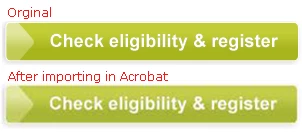
When I replace image in existing pdf it loses quality over the originally imported image. Is there any setting to improve the imported image quality?
I cannot share the original pdf due to our company's compliance policy restrictions. However, it applies to any image whichever you choose.
For testing purpose I've attached a sample pdf doc which contains an image, along with the same image used in pdf.
To recreate the issue, you can try replacing the image with the attached pdf and check the difference.
I observed the same quality loss issue while creating a new pdf from image through Acrobat. For pdf creation I'm using imagemagick script which doesn't suffer from the quality loss issue unlike Acrobat.
I think I know what's going on: I don't see a difference in the image quality, so that probably means that there is a setting that's different on your computer. Open up your Acrobat preferences, then go to the "Convert To PDF" category, select PNG as the format and then click on the "Edit Settings..." button. On the dialog that pops up, you can modify how a PNG image is processed when it's imported. The problem here is that Acrobat has to uncompress the PNG image data and then store it - for file size reasons - in a compressed format again. On this dialog, you can specify what compression mechanisms to use for different image types. This is what I use:
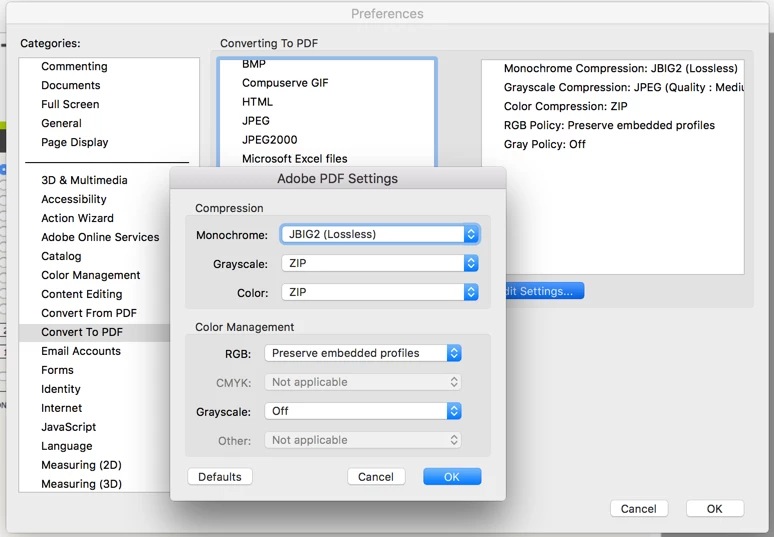
ZIP compression is lossless - and I don't see any change in the image quality - so I assume that your system is set up for JPEG compression with a low or medium quality setting. I am pretty sure that once you change this to ZIP, your image will come in looking just like the original. You can actually test with the Output Preview tool when you select the "Object Inspector":
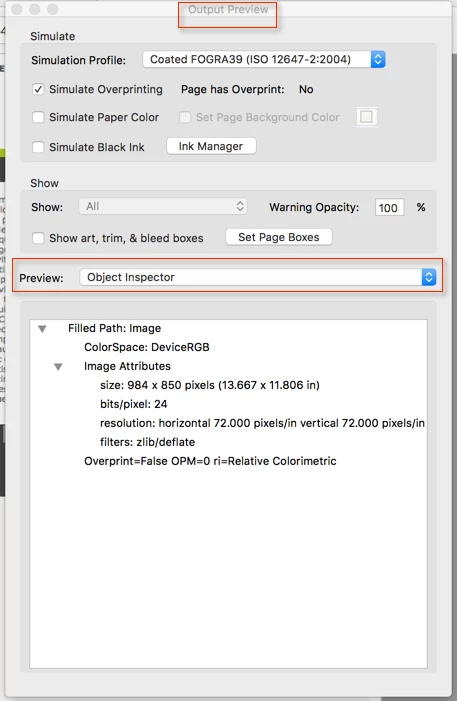
When you compare the original and modified image, you should see the same information.
Already have an account? Login
Enter your E-mail address. We'll send you an e-mail with instructions to reset your password.
 AdChoices