Participant
April 10, 2025
Answered

Replace Selected Text

  • April 10, 2025
  • 3 replies
  • 475 views

I can't open any of the edits I made using the "Replace Selected Text" tool. I have Adobe Acrobat Pro. I can see the red line over the edited text and the logo at the end of each edit, but I can't figure out how to open any of them. Please help.

Correct answer creative explorer

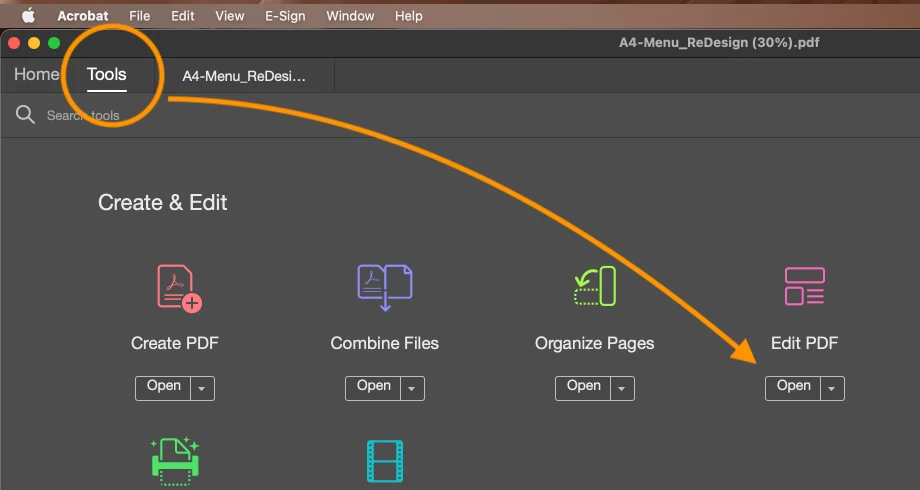
@steve_9907 instead, if you want to change the text, you need to go to

Tools - Edit PDF


Click on open


A dotted line will be around the text, go ahead and select the text to change the text


When done, click on close and save


3 replies

creative explorer
Community Expert
creative explorerCommunity ExpertCorrect answer
Community Expert
April 10, 2025

@steve_9907 instead, if you want to change the text, you need to go to

Tools - Edit PDF


Click on open


A dotted line will be around the text, go ahead and select the text to change the text


When done, click on close and save


m
creative explorer
Community Expert
Community Expert
April 10, 2025

@steve_9907 @the "Replace Selected Text" tool is for permanent removal (redaction), not for temporary changes or hiding that you can later reveal. The red line and logo confirm that the text has been redacted and is no longer accessible within that version of the document. You'll need to refer back to an unredacted original if you need the initial text.

m
Amal.
Community Manager
Community Manager
April 10, 2025

Hi there,

Hope you're doing well, and thanks for reaching out.

Could you please confirm whether this issue occurs with a specific PDF file or with all PDFs you’ve edited? Try opening and editing a different PDF file to check if the problem persists.

When you select the Edit tool and click on the edited text, what exactly happens? Do you receive any error messages? If so, please share a screenshot or a short video showing the steps you’re taking and how the issue appears. This will help us understand the problem more clearly.

Also, ensure that you're using the latest version of Acrobat Pro (25.01.2043X). You can check by going to Help > Check for Updates, and don’t forget to restart your computer afterward.

Also, please take a look at this help page: https://adobe.ly/3Rad5Hd

Let us know how it goes.