
Participant
April 24, 2023
Answered

Request for e-signatures missing Adobe Acrobat Pro 2020

  • April 24, 2023
  • 3 replies
  • 7717 views

Hello

We have several licences for Adobe Acrobat Pro 2020 acquired through Techsoup discounted software for non-profits.  We were given a string of serial numbers which we used and created Adobe IDs as per instructions we were given.  But the 'request for e-signatures' section does not appear on the desktop, we only ges these icons:
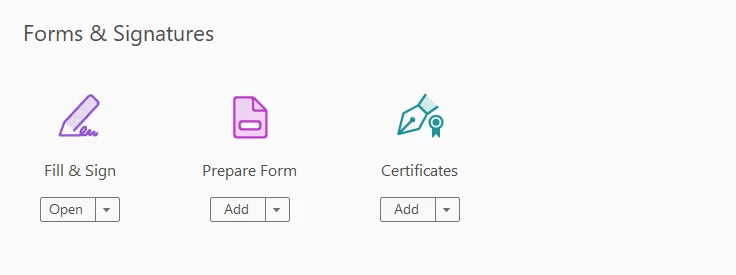
this is the same for every install we have tried.  we are using the 32-bit version and installing on Windows 10 Pro 22H2:
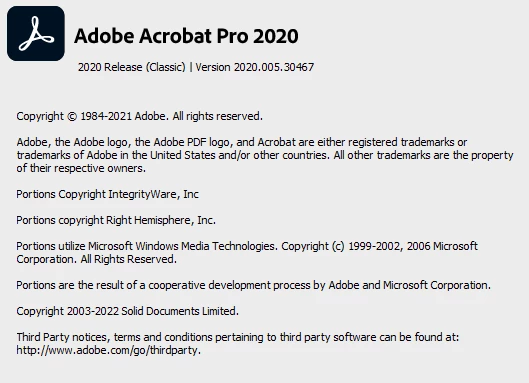
I have tried everything found online to try to get it to work:

  • reinstalled several times
  • used acrocleaner
  • tried various registry changes
  • downloaded the latest installer

but nothing works.  We bought the software for the specific purpose of using the reuest for e-signatures option.  Can anyone please help?

thanks

Mark

Correct answer Meenakshi Negi

Hi All,


Hope you are doing well, and thank you for reaching out.

The request signature feature is not available in the Acrobat 2020 classic version. The feature is available with the Acrobat continuous (subscription) version. For more information on Acrobat 2020 and Acrobat Pro, refer to the following help documents:

Acrobat 2020: https://helpx.adobe.com/acrobat/faq-acrobat-2020.html 

Acrobat: https://helpx.adobe.com/acrobat/faq.html 


If you have any questions, please let us know.


NOTE: This response is in accordance with the information provided in the initial message, and I assume you are using the Acrobat 2020 classic version. We have asked the admin to change the above responses to avoid confusion.


Thanks,

Meenakshi

3 replies

Meenakshi Negi
Community Manager
Meenakshi NegiCommunity ManagerCorrect answer
Community Manager
September 19, 2024

Hi All,


Hope you are doing well, and thank you for reaching out.

The request signature feature is not available in the Acrobat 2020 classic version. The feature is available with the Acrobat continuous (subscription) version. For more information on Acrobat 2020 and Acrobat Pro, refer to the following help documents:

Acrobat 2020: https://helpx.adobe.com/acrobat/faq-acrobat-2020.html 

Acrobat: https://helpx.adobe.com/acrobat/faq.html 


If you have any questions, please let us know.


NOTE: This response is in accordance with the information provided in the initial message, and I assume you are using the Acrobat 2020 classic version. We have asked the admin to change the above responses to avoid confusion.


Thanks,

Meenakshi

Participant
September 30, 2024

Sorry, but this is not really an acceptable answer!


As with the other posters here, we are also a nonprofit organisation. We also purchased licenses though Tech Soup as this appears to be the only way to access nonprofit pricing; from the adobe website “Adobe partners with TechSoup to distribute software.”


The ‘answers’ here keep referring to Acrobat 2020 classic version and Acrobat Pro. However, when purchasing the licenses it doesn’t refer to Acrobat 2020 classic but only Acrobat 2020 PRO.


You must therefore recognise that those posting here, including myself, are understandably frustrated that when we try to use the request e-signatures tool using the online version and it denotes it as a pro version feature and prompts us to upgrade, despite us all being under the impression that we had purchased a pro version.


It feels as though Adobe are fleecing nonprofit organisations and the answers here are deliberately obfuscating the situation by now only referring to the Acrobat 2020 Pro version as Acrobat 2020 Classic and referencing generic 2020 FAQs.


Have we all been conned into purchasing a ‘pro’ product in name only?


Adobe seem to have a particularly confusing and complicated process for obtaining nonprofit pricing. Even those who purchase a Pro DC membership appear to only receive the nonprofit pricing for one year. What then after the year? It is automatically raised to a higher business rate?


There is a chasm between the offering of Adobe to nonprofits and that of other large tech companies. Take Microsoft for example where the pricing for nonprofits is clearly set out and you know what you are paying for!


This showing from Adobe is very disappointing.

Participant
September 30, 2024

Well put!  I'm in the exact same position.  I purchased several Adobe Acrobat 2020 PRO licenses from Tech Soup for our non-profit.  Partly to circulate documents for signature to Board members and volunteers, sadly it was never clear that this functionality isn't availalbe.

Participant
June 24, 2024

Unfortunately - I wasn't aware that Adobe removed the e-signature request feature from Adobe Acrobat Pro 2020 and we recently purchased many new licenses from Tech Soup.


What a waste of money and time...

Amal.
Community Manager
Community Manager
June 25, 2024

Hi there


Please go through the help page https://helpx.adobe.com/acrobat/faq-acrobat-2020.html to know more about the features and functionalities of Acrobat Pro 2020.


Hope this information will help


~Amal

Participant
July 7, 2024

Hi Amal, 


Can you please provide a specific response to the problem listed above, instead of a link to the generic FAQ page?

It appears that many people (myself included) purchased a perpetual license to Adobe Acrobat Pro with an understanding that we would be able to utilise the 'e-signature request' feature. If this is not currently possible, please advise accordingly.


Can you also please advise if this feature will be released via an update and is on the development road map for the perpetual license version of Adobe Acrobat Pro?


Like many people on this thread, I feel very mislead by Adobe with the blatant gap in functionality between the 2 versions of this product.

Amal.
Community Manager
Community Manager
April 24, 2023

[Edited response by Admin]


Hi @Markdwtuk 


You might be wondering why you can't find the Request Signature feature using Acrobat 2020 Classic. This can be confusing, but here’s why it’s not available in your version:

The Acrobat 2020 Classic version is a one-time purchase, meaning it doesn’t receive new features after it’s released. This version is considered "feature-locked," meaning whatever features it has when you buy it, that's what you’ll get.

On the other hand, the Acrobat Continuous version (which is the subscription version) is always updated with new tools and features, including the Request Signature option. This version is part of Adobe’s Document Cloud services. If you rely on requesting signatures often, upgrading to the Continuous version might be a better option.

So, what’s the difference between Acrobat 2020 Classic and Acrobat Continuous?

  • Acrobat 2020 Classic:

    • One-time purchase, no updates with new features after release.
    • Doesn't include cloud services or the Request Signature feature.
    • Perfect for users who don’t need ongoing feature updates or e-signature functionality.
  • Acrobat Continuous (Subscription):

    • Requires a monthly or yearly subscription.
    • Constantly updated with new features, including Request Signature and other cloud-based tools.
    • Ideal for users who need the latest tools.

What can you do if you need the Request Signature feature?

If you need to request signatures frequently, you’ll need to switch to the Acrobat Continuous (subscription) version, which includes these tools as part of the package. This version ensures that you have access to all the latest Adobe features.

Want to know more?

If you're curious about what else Acrobat 2020 offers in terms of features, check out the following link for more detailed FAQs:


Regards
Amal

MarkdwtukAuthor
Participant
April 26, 2023

Hello


thanks for the reply. i have tried to repair it several times but it doesnt make any difference.  i couldnt find any prefernces folder in the app data folders.  I have been running the program from an administrator account and even running 'as administrator' doesnt help.


have uploaded the Procmon files here https://we.tl/t-zF10jO0ug1 .


thanks for your help

Mark