
Participating Frequently
December 4, 2021
Answered

"Request Signatures" locks up on "Uploading to Adobe Sign" screen. This has been a problem for weeks

  • December 4, 2021
  • 13 replies
  • 32609 views

I click "Request Signatures" and input recipient's email address. The screen locks up on "Uploading to Adobe Sign". This has been a problem for weeks. I have tried every solution on these forums. It's clear a lot of people are having this same problem and nothing fixes it. Come on, Adobe. You are charging for this product, yet this is a very basic and important function that doesn't work. I know you will probably come back with the same scripted response telling me to do the same things I have already done, so please skip that. What I want to know is this: if there is really no solution available because this is a bug that Adobe refuses to fix, can someone please recommend another product I can use to send a document for signature? Thank you very much!
Correct answer LCAadmin

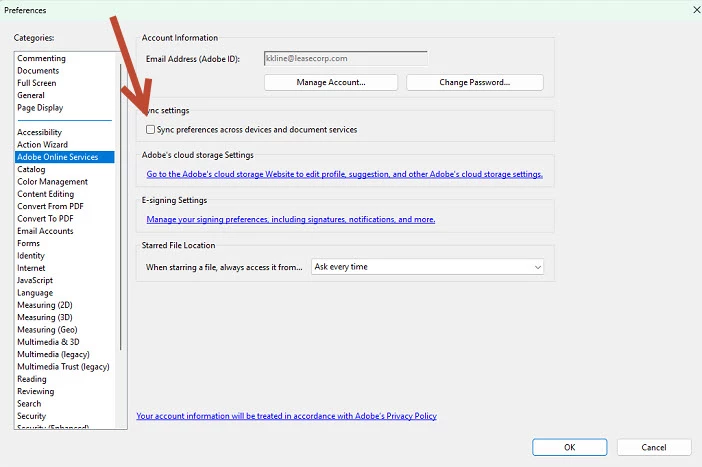
We figured out that if you go into preferences and turn off the Sync preferences across devices document services in the preferences, Adobe Online Services. Give it a try....it worked for us. Boom, turned it off, tried to send, and it went through. Good luck folks!


13 replies

Participant
November 22, 2023

The best solution to this problem is not to use the desktop app but instead login to the web version of Adobe and drag and drop your PDF.

This worked for me staright away.

Participant
July 29, 2024

Same problem, soon after clicking the bottom it would just goes straight into a infinite loading. 

Participant
October 26, 2023

Same issue here. Adobe, very poor customer support. Just a quick search about this issue leads to multiple discussions that are open and unresolved. It is clear that this is a issue and it is a very important feature for a lot of us here. The online web version doesn't even show the "Request E-Signatures" feature anymore. Desktop version doesn't work. I hope my organization moves away from this product.

Participant
November 7, 2023

Same issue with me. I used to use e-signatures regularly, but in the last few weeks I am unable to use this at all. Can this be resolved?


I can click on the request e-signatures as I have always previously done, however, when I click on 'specify where to sign' the document the screen stops at uploading, and I have to force quit. I am using a Mac at present but there is the same issue on two different PC's. 

Participant
November 11, 2023

I am having the same issue. I need to have my contract sign and it won't let me go beyond specify where to sign button.

Participant
May 24, 2023

Create a new account just to reply to this problem.


1. Sign out of Adobe account in Adobe Acrobat.

2. Unassign the Acrobat Pro license from admin console, wait 2-3 min and assign it to the user again.

3. Reopen Adobe Acrobat and have the user sign-in again.

LCAadminCorrect answer
Participant
April 27, 2023

We figured out that if you go into preferences and turn off the Sync preferences across devices document services in the preferences, Adobe Online Services. Give it a try....it worked for us. Boom, turned it off, tried to send, and it went through. Good luck folks!


Participating Frequently
April 6, 2023

Same problem as ours. This error occurs on desktop application but works on online version.

Thank you and hoping for quick resolution on this matter.


Meenakshi Negi
Community Manager
Community Manager
April 11, 2023

Hi Felipe28314989ipd1,


Thank you for reaching out.


As mentioned, the issue occurs with the desktop application. It works fine on the online version.

Please share the following information so we can investigate this issue further:

- Let us know when you started experiencing this issue.

- Share the Acrobat and OS version numbers on your machine.

- Share the screen recording of the workflow on both desktop and online.

- Share the process logs for the desktop application using the steps suggested on the following help page: https://www.adobe.com/devnet-docs/acrobatetk/tools/Labs/acromonitor.html

Your information will help us in the investigation of the root cause.


Thanks,

Meenakshi

Participant
April 5, 2023

having this same issue, tried each solution everyone has state to no avail. Adobe is even increasing prices soon and this is making my company reconsider using adobe in the future.

Meenakshi Negi
Community Manager
Community Manager
April 6, 2023

Hi Jeff29263856u5z9,


Thank you for reaching out.


Could you please confirm if the issue occurs only with the desktop application?

Try checking the Acrobat Online account. See if you can send the document.

Open the link and sign in using your Adobe ID. Go to the E-sign tab > Request Signature.

Let us know how it goes.


Thanks,

Meenakshi

Participant
April 5, 2023

Same problem.  What's the latest fix?

 Thanks

Meenakshi Negi
Community Manager
Community Manager
April 6, 2023

Hi Adam29256706knt8,


Thank you for reaching out.


If you are using the same email address that is used to sign in here on the community, I see that you are using Acrobat as a part of the End term license agreement provided by your organization.

Would like to inform you that the Adobe Acrobat Sign individual has been removed from the Acrobat Pro in ETLA offers. In this case, we suggest you contact your organization's IT administrator to check if they can provide you access to the Adobe Acrobat Sign Enterprise plan.

For more information, please refer to the following help page: https://its.unc.edu/wp-content/uploads/sites/337/2020/06/FAQ-RemoveSignIndividual-6.4.2020-External.pdf


Let us know if you have any questions.


Thanks,

Meenakshi

Participant
March 22, 2023

Same problem here! Very frustrating.

I can see that there are many saying this feature is not working - it is clearly something that Adobe needs to resolve, instead of constantly giving advise that is not working, and asking for screen-shots. It is not working...

Participant
March 22, 2023

I need to send out bulk documents for signature so this feature is essential. I was advised by IT at my company that there is no option for request signatures in the new version.

Participating Frequently
March 14, 2023

I encountered similar issue even on the  latest Contomuous Release version 2023.001.20064. Hope Adobe will provide immediate resolution on this matter. Thank you

Meenakshi Negi
Community Manager
Community Manager
March 15, 2023

Hi Felipe28314989ipd1,


Thank you for reaching out, and sorry about the trouble.


Could you please confirm if the issue started recently?

Did you check if you can send the document via Acrobat online account? If not, please check using the following steps:

1. Open the link and sign in using your Adobe ID.

2. Go to E-Sign >Request Siganture.

Let us know how it goes.


Thanks,

Meenakshi   

Participating Frequently
March 16, 2023

Thanks for the response Meenakshi.
This issue was observed as soon as we deployed this version of Adobe Acrobat Pro. I tried to more than 5 computers with same result/problem. 
With regards to the cloud or online version, we have no issues. The only problem is the desktop version.

Thank you and appreciate your kind  support and assistance.


Felipe


Participant
January 4, 2023

I am having the same issue. I have a document that I need to be signed today I created it and not when I request the signature it just sits and spins. I have tried 2 different computers and still no luck been trying to send this document ALL day. WTH?  the simple job turned into a very stressful situation if I cannot get this form sent for signature TODAY!!