MaksDad07
Inspiring
January 18, 2019
Answered

Required fields not red

  • January 18, 2019
  • 1 reply
  • 4146 views

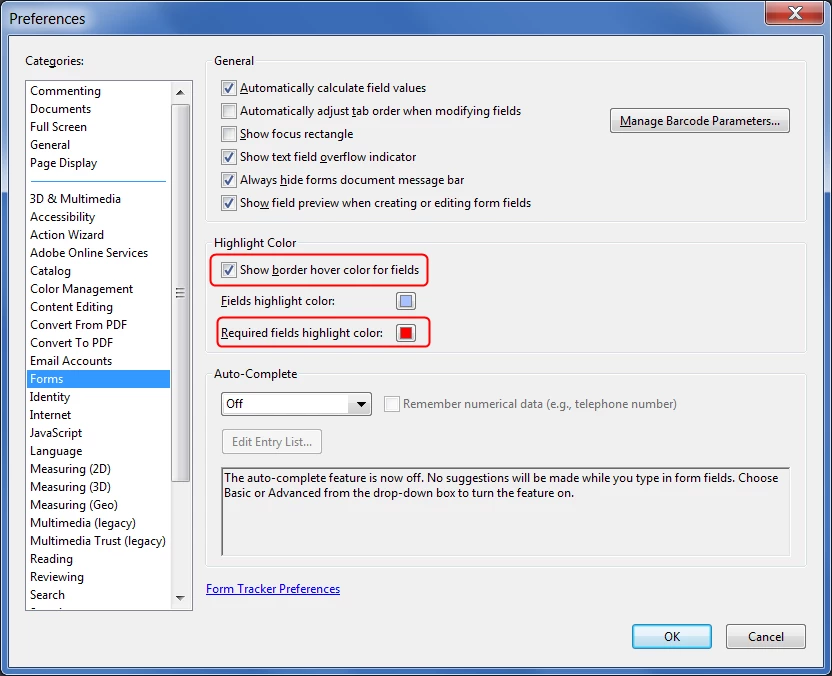
Border of required fields is red on my computer.  When the fillable form is opened on the end users computer (Acrobat Reader only), the field looks like a not required field?  The field is still a required field, just not denoted by the red border.  I looked and did not find anything that was checked off in the view options.  Am I missing something?
This topic has been closed for replies.
Correct answer try67

It's under Edit - Properties - Forms:

1 reply

try67
Community Expert
try67Community ExpertCorrect answer
Community Expert
January 18, 2019

It's under Edit - Properties - Forms:

user4152557
Participant
February 7, 2023

My required fields have the Border color Red checked and it appears red in Adobe Acrobat Pro. When I open it in Adobe reader the RED border does NOT aoppear. ThoughtsThnaks, Doug

Bernd Alheit
Community Expert
Community Expert
February 7, 2023

Check the preferences of Reader.