Participant
Jun 13, 2016 11:12 AM UTC
Answered

RESIZE PDF

Hi,

I'm using Acrobat Pro on my mac and i can't find out how can i resize (dimension of file) the pdf.

Please HELP ME!!!

Thank you

Karl Heinz  Kremer
Karl Heinz KremerCorrect answer
Community Expert
Jun 13, 2016 1:36 PM UTC

To just change the size of the page without scaling the content, you can use the crop tool, which allows you to either crop down to a smaller size, or change the page size to a larger page size.

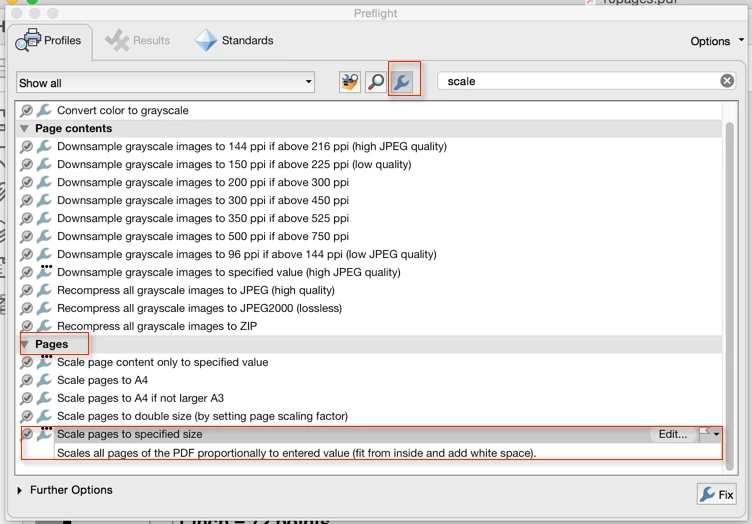
If you want to scale, if you have Adobe Acrobat Pro, you can actually do this in Acrobat without the need for any other software: The "Preflight" tool contains a profile that resizes all pages to a specified size:

Once you click on the "Fix" button at the bottom of the dialog, you will be prompted for a page size (which you have to specify in millimeters), and then all pages will get scaled to that size.

Acrobat Standard does not have the preflight tool.

17 replies

Participating Frequently
Nov 14, 2020 2:10 AM UTC

THANK YOU for the crop page tip that allowed me to add to page size without scaling content.  

Translate
Participant
Dec 13, 2022 7:00 PM UTC

I am really finding this beyond frustrating. It's bad enough it's so complicated but when 99% of the past explanations do not align with the menu now it's just a spiral of bad uses of time. I want my documents all in letter size. Print to PDF is not appearing in the options on my mac. Preflght (or whatever) does not have the options above and was hidden in "more tools" ... seriously folks--please take your users' experience more seriously. Sometimes we have to do one-off tasks and this makes it miserable

Translate
Bernd Alheit
Community Expert
Community Expert
Dec 13, 2022 7:15 PM UTC

What version of Acrobat does you use?

Translate
Inspiring
Aug 25, 2017 8:25 AM UTC

did they remove this feature? i really need it and i cant find it ...

Translate
Bernd Alheit
Community Expert
Community Expert
Aug 25, 2017 8:30 AM UTC

Use the library "Acrobat Pro DC 2015 Profiles".

Translate
Karl Heinz  Kremer
Community Expert
Community Expert
Aug 25, 2017 11:39 AM UTC

You set this st the top of the dialog, where it says "Essentials"

Translate
Karl Heinz  Kremer
Community Expert
Karl Heinz KremerCommunity ExpertCorrect answer
Community Expert
Jun 13, 2016 1:36 PM UTC

To just change the size of the page without scaling the content, you can use the crop tool, which allows you to either crop down to a smaller size, or change the page size to a larger page size.

If you want to scale, if you have Adobe Acrobat Pro, you can actually do this in Acrobat without the need for any other software: The "Preflight" tool contains a profile that resizes all pages to a specified size:

Once you click on the "Fix" button at the bottom of the dialog, you will be prompted for a page size (which you have to specify in millimeters), and then all pages will get scaled to that size.

Acrobat Standard does not have the preflight tool.

Translate
Marvest
Inspiring
Jun 28, 2016 2:37 PM UTC

I don't see the "Scale pages to specified size" option on Acrobat Pro DC, only "Scale pages to A4" and "Scale pages to A4 if not larger A3". Is that profile available to download somewhere?

Translate
Bernd Alheit
Community Expert
Community Expert
Jun 28, 2016 2:47 PM UTC

Activate following button:

Translate
Bernd Alheit
Community Expert
Community Expert
Jun 13, 2016 1:34 PM UTC

Use the preflight tool of Acrobat Pro DC.

Translate
try67
Community Expert
Community Expert
Jun 13, 2016 12:21 PM UTC

Do you mean scale the pages? This is not really an option in Acrobat. In Windows it can be done by sending the file to the Adobe PDF virtual printer with the new page size, but that option is not available on a Mac. It might be possible using the Preflight tool, but I'm not 100% sure about that.

The other option is to use a script, like this one I've developed: Custom-made Adobe Scripts: Acrobat -- Scale PDF Pages

Translate