


Known Participant
December 21, 2022
Question

Restrict Editing - Permissions

  • December 21, 2022
  • 2 replies
  • 952 views

Why is not allow to fill the text fields when selecting this permission "Inserting, deleting, and rotating pages"    Once that option is selected and documents settings are saved it covert the text field as READ ONLY.   I would to insert and delete pages and be able to fillout the document.   How can that be done?
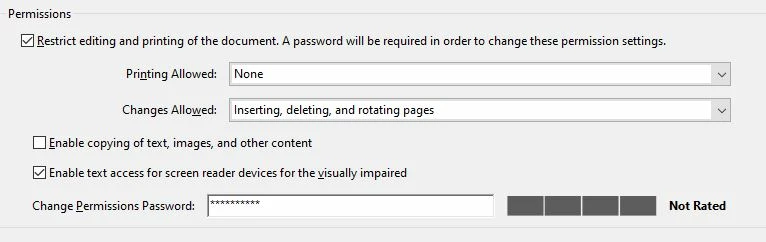
This topic has been closed for replies.

2 replies

Amal.
Community Manager
Community Manager
December 22, 2022

Hi @defaultuurm3vtijznq 


++ Adding to the discussion


You may share your feedback to the engineering team using the link https://www.adobe.com/products/wishform.html


Regards

Amal

Bernd Alheit
Community Expert
Community Expert
December 22, 2022

You must allow form filling.

Known Participant
December 22, 2022

I want that specific setting. I tried all options but none of them do what I need for the product I created.


I Just need a setting that allow me insert and delete pages without converting the fields to read only, also to block editing.


Some options block editing but then won't allow me to insert or delete pages.


If I choose the last option under Changes Allowed to "Any except extracting pages" will satisfy most of my need but won't block the document to be edited


I want that no one can edit the document format but be able to do filling,  insert and delete pages.

Technically I just need a setting

Bernd Alheit
Community Expert
Community Expert
December 22, 2022

What you want is not possible in Acrobat.