
Participant
November 28, 2017
Answered

[right click] Convert to PDF question - Acrobat XI Professional

  • November 28, 2017
  • 1 reply
  • 1347 views

Can I [right click] Convert to PDF, and have the resulting PDF go to the source file folder? Currently anything I convert saves to my Documents folder, and I would prefer to save it with the original file.
This topic has been closed for replies.
Correct answer AkanchhaS8194121

Hi Sigshane,

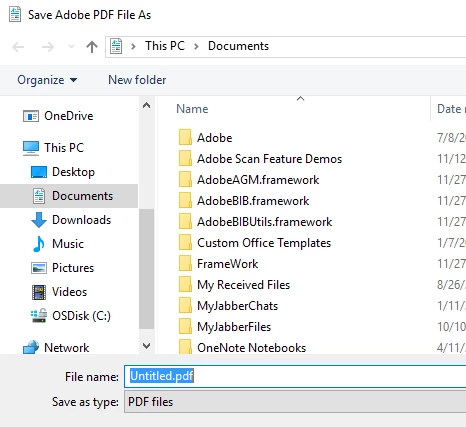
If i understand correctly, you selected a file (for eg. word doc) then right clicked on that> Convert to Adobe PDF> and then get another pop up window to save the file shown in the picture below-

You can change the document location from the menu you see at the left bar.

Hope this is what you were referring to?

Regards,

Akanchha

1 reply

AkanchhaS8194121
AkanchhaS8194121Correct answer
Legend
November 28, 2017

Hi Sigshane,

If i understand correctly, you selected a file (for eg. word doc) then right clicked on that> Convert to Adobe PDF> and then get another pop up window to save the file shown in the picture below-

You can change the document location from the menu you see at the left bar.

Hope this is what you were referring to?

Regards,

Akanchha

sigshaneAuthor
Participant
November 28, 2017

You know what? I was mistaken on what I was talking about. It is printing to Adobe PDF. I would rather it prompt me for filename and location instead of auto-saving the current name and My Documents as the location.

Thanks so much for your assistance, I will do a little digging now that I have my wits about me!

Shane

Edit: and now I have found that setting too. I had to go into the properties panel for the Adobe PDF "printer" and set it to "prompt for a PDF filename".