


Participating Frequently
March 27, 2024
Question

Rounded vs. Blunt edges on highlight tool

  • March 27, 2024
  • 4 replies
  • 3936 views

Hello. Would anyone here know, by any chance, how to select the type of edges (round or blunt) on the highlight tool in Adobe Acrobat Pro (it's what I'm using, v4, 64bit)?


I've been looking all over the Internet for an answer to this, including tons of messages in the Adobe Community forum, but couldn't find anything satisfactory. In fact, many people say it's not possible to switch. But I disagree, and here is why:


My highlighting tool had always given me blunt edges until I upgraded to the new Acrobat version (Modern Viewer), which I've been using for over a year now. In the new version, the H.L. edges became rounded, so I thought it was something related to the upgrade. I spent over a year thinking that. Cut to last week (2024-03-15) when my 5-yeard old son hit my keyboard by mistake and BAM -- the highlight tool started giving me blunt edges, right then and there. My son made the switch by mistake, and I now have highlighted excerpts showing both edges in the same document!


Please have a look at the printscreen below:
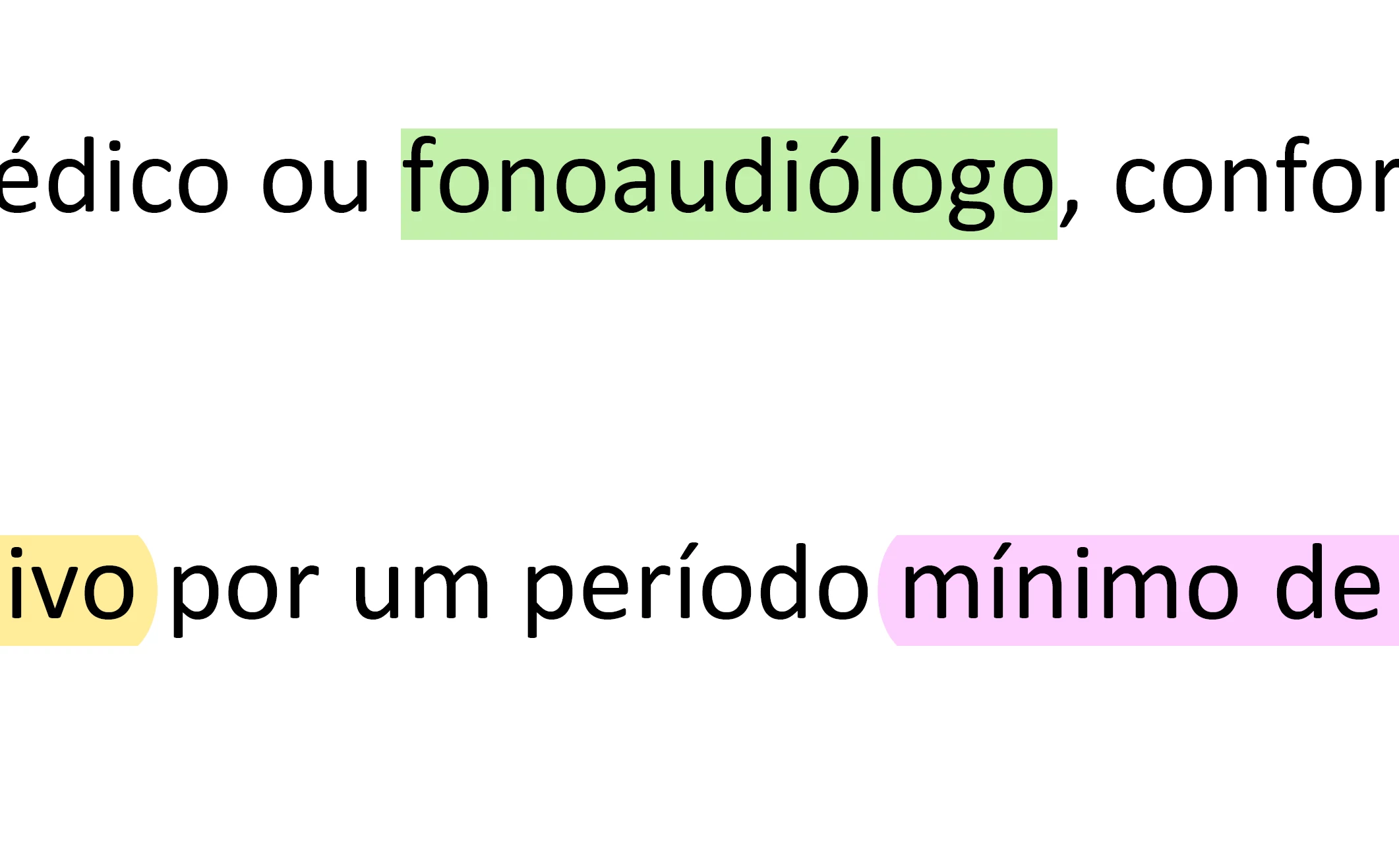
I have text highlighted in yellow and purple with round edges (from before my son hit my keyboard), and green with blunt edges (which I got the minute after my son hit my keyboard). In the flick of a switch (or rather, with the hitting of a keyboard key!), the HL style changed, and I don't know how to put it back the way it was.


Well, to be honest, I prefer the blunt edges, but it would be nice to know how to select that particular property at will. I've been through hundreds, perhaps thousands, of messages so far, but can't find an answer to this. In fact, I've seen some people go so far as to categorically state you can't change styles, that's it's something baked into Adobe's factory settings. But clearly, that is not he case, since I literally saw the change before my eyes: I had a file open and was highlighting it, round edges as usual. In comes my infant son, who hits my keyboard and has it changed involuntarily, and the next minute I'm highlighting text with blunt edges. . One minute I had round edges, the next minute I had blunt edges. I can't figure out how this works!


Can anyone help? Does anyone know how to select the type of edges you want for the highlight tool?


Thanks so much in advance.

This topic has been closed for replies.

4 replies

Stijn D
Participant
May 28, 2026

No update on this? I also discovered this difference today as I moved from Acrobat 2015 to the perpetual license. 

Can this still not be changed?

Moreover, the 21 suggested colors in the highlight section differ from the highlighted colors I used before. If anyone knows how to edit the colors in that pop-up, I would be grateful (I made a separate post about this). 


Inspiring
September 5, 2024

curious how you got the different colors? I assume you manually changed the highlight colors? I'd love to have multicolored tool options, especially the draw tool, for underlining / marking texts.

Participating Frequently
September 5, 2024

@JIPNET ,

> curious how you got the different colors?

You assumed correctly! I highlighted the words I wanted, then manually changed the highlight colors for each. I have a system in place that I've been using for many years now:

  • Yellow: regular highlighting, anything that calls out my attention
  • Green: out-of-the-ordinary highlighting. Used either for information that should pop out (from all the yellow) or used topically (e.g., names of people, institutions, theories, etc.)
  • Orange: used for titles, chapters
  • Blue: for when I want to write notes
  • ...and so on.


> I'd love to have multicolored tool options, especially the draw tool, for underlining / marking texts.

I feel you. I just do it all manually. It obviously takes some time to do it (more than if you didn't do anything, anyway), but it helps a lot later when you need to review the information. Your eye spots the relevant information much more easily, and you can also retain it longer, as you associate the information with the colors used.

At least that's how I feel about it. 🙂

JoeStLouis
Participant
June 9, 2024

Optimize the document and you the highlighting will be square.

Participant
July 31, 2024

Re-read the OP's post; we prefer it to be rounded. As far as I can tell, it remains squared anyways regardless of whether it's been optimized.

Amal.
Legend
April 3, 2024

Hi there


Hope you are doing well and thanks for reaching out.


The option to toggle between the blunt and sharp highlight corners is not available.


Would you mind sharing the version of the Acrobat DC you are using? To check the version go to Help > About Acrobat and make sure you have the recent version 24.01.206XX installed. Go to Help > Check for updates and reboot the computer once.
 
Also try to repair the installation from the help menu (Win Only) and see if that works.
 
Please try to reset the Acrobat preferences as described here https://adobe.ly/4aGUVEs and see if that works.


~Amal

Participating Frequently
April 3, 2024

Hi, Amal. Thank you for getting back to me.


> Would you mind sharing the version of the Acrobat DC you are using?

Every time I click that "About" panel, it changes into something else, so I'm not sure which of those version numbers you're looking for. I've typed them all down. Perhaps you mean the second line?


Continuous Release | Version 2024.001.20643 | 64-Bit
Version File Version: 24.001.20643.0
AGM Version 7.001.0004 | 64-bit
CoolType Version 8.003.00005 | 64-bit
Core Version 24.256 | 64-bit
JP2K Version 4.00.00002.54248 | 64-bit


> make sure you have the recent version

I have the latest version. At least that's what Adobe tells me, where it reads "Version 24.1 (latest)":


> Go to Help > Check for updates and reboot the computer once.
I did, and I rebooted (in that order). But that didn't change anything.


> Also try to repair the installation from the help menu (Win Only) and see if that works.
I did that, but it didn't help, either.


> Please try to reset the Acrobat preferences as described here https://adobe.ly/4aGUVEs and see if that works.

I have also tried that, but nothing changed either.


I've also uninstalled Adobe Acrobat altogether, rebooted, and then reinstalled it from scratch -- to no effect. I still have the blunt edges. I do not know how to go back to rounded edges.


From what you said, it's not possible to change styles, but could you explain how the style got changed in the first place? I'm not talking about a change seen in the course of months. Or weeks. Or days. Or overnight. I saw this change happen in the space of 5 minutes. I was marking a PDF (rounded edges), and in the time it took me to take my son to the next room and come back (~5 mins, 10 mins?), the highlight markings now had blunt edges. If it's not possible to change styles, I don't understand how this happened. I still have documents from a week ago highlighted with rounded edges. How do I get back to that? And, if I get the rounded edges back, how do change them to blunt edges? I do not understand how this works. And I'm not the only person facing this issue.

Amal.
Legend
April 8, 2024

Hi there


I have shared your observation with our engineering team for review, we will share the update as soon as we get any information.


Thanks for your time and patience.


~Amal