
Participant
June 22, 2022
Answered

Save As file type missing after updating to version 20142

  • June 22, 2022
  • 7 replies
  • 7559 views

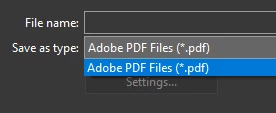
After updating to the newest Acrobat DC version, 20142, the "Save as type" function no longer has any file types.  The only option is to save as PDF.   I know the Export function is there, however, it doesn't work for our needs.  The save as jpeg function was able to convert the pdf pages into individual jpegs that if combined back together, the combined file size would be the same as the original pdf.  The Export function, creates jpeg's that if combined back, create a file almost two and a half times the size of the original.  
 

This topic has been closed for replies.
Correct answer Sharon Z PrintExp

The fix from Jason25082404mjrt in the comment above worked for me! You have to uncheck the "show save to online storage setting" in your preferences. See his note above. Thank goodness for the community posts!!


7 replies

Amal.
Legend
July 12, 2022

Hi there


Hope you are doing well and sorry to keep you waiting .


The new version 22.1.20169 containing the fix for the issue is now available. Please update the application from the help menu > check for updates and reboot the computer once.


You may also download the patch manually from the link https://www.adobe.com/devnet-docs/acrobatetk/tools/ReleaseNotesDC/continuous/dccontinuousjul2022.htm...


Let us know how it goes.


Regards

Amal

Participant
July 6, 2022

Jason...thnx dude...this is a major & quick way of drawing conversion when I use Autocad...hey Adobe, why change something just to change it, you've done other boneheaded things in the past...nothing surprises me...Jason, thnx again for the help !

Participant
June 30, 2022

Found a solution for the file types not showing up in the drop down of the "Save As" menu.

  • Open Acrobat
  • Click on “Edit” in top left corner
  • Select “Preferences” at the bottom of the list
  • Select “General” from the list on the left
  • Locate “Show online storage when saving files” and clear the checkmark there (uncheck it).
  • Scroll down to the bottom and click “Ok”. 
  • Close and Re-Open Acrobat.   


Participant
July 1, 2022

Thanks Jason!

Your technique worked! I can save to .jpg again. Thank goodness, I was about to have a disasterous 4th of July weekend.


Participant
June 30, 2022

Yep, having the same issue here. Did anyone find a fix ?


daniels24042250
Participating Frequently
June 29, 2022

I'm having the same issue after the forced update....any fix found yet?

Bernd Alheit
Community Expert
Community Expert
June 23, 2022

Use Adobe Acrobat DC, not Acrobat Reader DC.

JR Boulay
Community Expert
Community Expert
June 23, 2022

Bernd Alheit you should try with the latest version of Acrobat Pro DC: only one choice in the menu and the "Settings…" button is grayed out.


Acrobate du PDF, InDesigner et Photoshopographe
Bernd Alheit
Community Expert
Community Expert
June 23, 2022

I use this version of Adobe Acrobat Pro.

JR Boulay
Community Expert
Community Expert
June 23, 2022

I guess that it's a "new feature"…

You can edit the "Export To" JPEG settings in the Preferences.


Acrobate du PDF, InDesigner et Photoshopographe