
Participant
February 6, 2025
Question

Save button not active upon closing Acrobat file

  • February 6, 2025
  • 2 replies
  • 482 views

Acrobat has been doing this for a few months. I don't edit more than handful of PDFs on a regular basis. However, I have started a project that involves editing hundreds of PDFs. I would rather not have to grab my mouse every time I'm closing an edited document. 
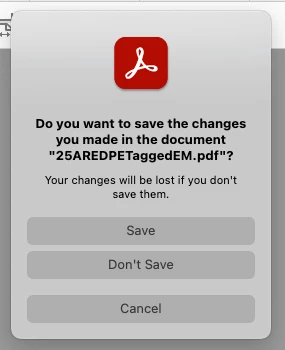
See the Acrobat close-window to see that no button is highlighted for me to just hit the Return key to save it.
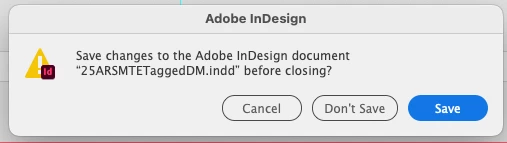
The InDesign close-window behaves like I expect it to. Acrobat used to behave this way also.
Did I accidentally change a preference in Acrobat?
2 replies

Participant
February 9, 2025

Maybe check the accessibility settings or keyboard shortcuts in preferences? Could be an update changed the default behavior Redefining Success.

McNair_TBAuthor
Participant
February 13, 2025

I checked through those. I don't see anything that applies to the "Save changes" dialog window. I'll keep fiddling with stuff and see if I can find a solution.

Amal.
Legend
February 6, 2025

Hi there


Hope you're doing well and sorry to hear that.


Could you please check which version of Acrobat Pro you're using? You can do this by going to Help > About Acrobat. If it’s not updated, please install the latest version (24.05.2039X) by going to Help > Check for Updates. After updating, restart your computer and see if the issue is fixed.


You can also try repairing the installation. Just go to Help > Repair Installation, let it finish, and then restart the app.


Let me know if the problem continues.


McNair_TBAuthor
Participant
February 6, 2025

Thank you.
I'm on a Mac. It says this is the latest version (2024.005.20400).
See the attachment. I don't have a "Repair Installation" option. 

McNair_TBAuthor
Participant
February 6, 2025

I was going to uninstall and reinstall Acrobat. Unfortunately, our company IT security keeps me from being able to do that. Ugh.