


Participant
October 7, 2026
Answered

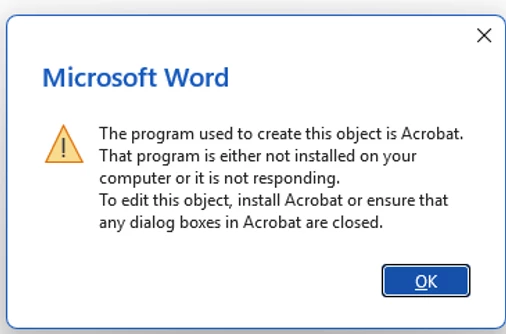
Saved a .pdf in a word document, now won't open

Years ago, I saved a .pdf into a MS Word .docx. I did this to password protect the pdf.  I open in Word, Double click on the .pdf image and get an error that says Acrobat is not installed so can’t open.  There’s no selection for open with.  Adobe Acrobat IS installed as an app on my computer. Why won’t it use it to open.  See error below. I will also check for info in MS Word support.  Thanks for any assistance you can offer!!


    Dave Creamer of IDEAS
    Dave Creamer of IDEASCorrect answer
    Community Expert
    October 7, 2026

    Find a PDF on your computer and make sure the .pdf extension is associated with the Acrobat program. It’s slightly different on Mac and Windows, so it would help to know what OS you are usings. 

    David Creamer: Community Expert (ACI and ACE 1995-2023)

    3 replies

    Carolh880Author
    Participant
    October 8, 2026

    I finally just removed/uninstalled the app and reinstalled Adobe Acrobat Reader. Now it works. Thanks for your input though!  

    Translate
    Dave Creamer of IDEAS
    Community Expert
    Community Expert
    October 8, 2026

    Reinstalling usually fixes the file association so I suspect that was the problem.

    Translate
    David Creamer: Community Expert (ACI and ACE 1995-2023)
    Dave Creamer of IDEAS
    Community Expert
    Dave Creamer of IDEASCommunity ExpertCorrect answer
    Community Expert
    October 7, 2026

    Find a PDF on your computer and make sure the .pdf extension is associated with the Acrobat program. It’s slightly different on Mac and Windows, so it would help to know what OS you are usings. 

    Translate
    David Creamer: Community Expert (ACI and ACE 1995-2023)
