Participant
Oct 21, 2026 6:42 AM UTC
Answered

Saving a PDF while said PDF is open

Dear Adobe peeps,

can you please add the option or just save the newest version of a pdf that you’re exporting while the pdf is open? Like just SAVE AND GO it instead of having to go back > close the one that is open > then save. I am sorry this is actually quite hard to explain in writing, but IYKYK

like if it could be possible. I dont care if it closes the old pdf or just saves and opens the new one alongside as long as i dont have to go back to close the original one that i always forget is there waiting. 

I will love you forever. thank you.



    justlearn
    justlearnCorrect answer
    Community Expert
    Oct 21, 2026 10:55 AM UTC

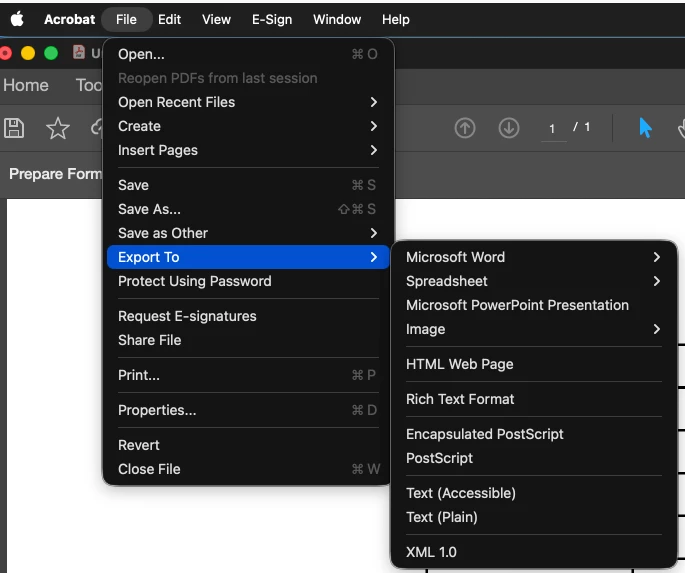
    ​@sincere_Melodye81c If you are ‘Export To’ — it shouldn’t ask you to close the PDF, because it’s going to create a new file, not as a PDF:


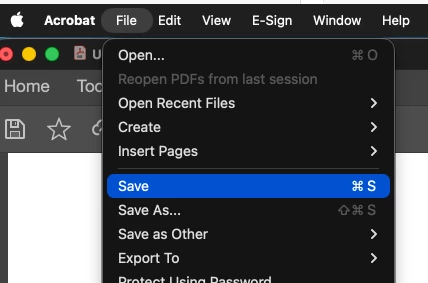
    If you use ‘Save’ it wouldn’t give you a warning, it just ‘overwrites’ what you had:


     Save As or Save as Other will give you the option to rename your file or change the settings.

    I haven’t experience what you have gone through. I would suggest updating to the latest Acrobat that you can. ​​​​​​​

    m

    2 replies

    justlearn
    Community Expert
    justlearnCommunity ExpertCorrect answer
    Community Expert
    Oct 21, 2026 10:55 AM UTC

    ​@sincere_Melodye81c If you are ‘Export To’ — it shouldn’t ask you to close the PDF, because it’s going to create a new file, not as a PDF:


    If you use ‘Save’ it wouldn’t give you a warning, it just ‘overwrites’ what you had:


     Save As or Save as Other will give you the option to rename your file or change the settings.

    I haven’t experience what you have gone through. I would suggest updating to the latest Acrobat that you can. ​​​​​​​

    Translate
    m
    Meenakshi Negi
    Community Manager
    Community Manager
    Oct 21, 2026 10:20 AM UTC

    Hi sincere_Melodye81c,


    Thank you for reaching out, and sorry to hear about your experience with saving files.

    When saving the changes you made in the PDF, click on "Save," and it will be saved in the same file. You do not need to close the file first.

    If you are referring to something else, please share a short video demonstrating how you are trying to save your changes and what you are experiencing on your end. We will review it and let you know whether it is possible.

    We look forward to your response.


    Thanks,

    Meenakshi

    Translate