
Participant
January 29, 2024
Question

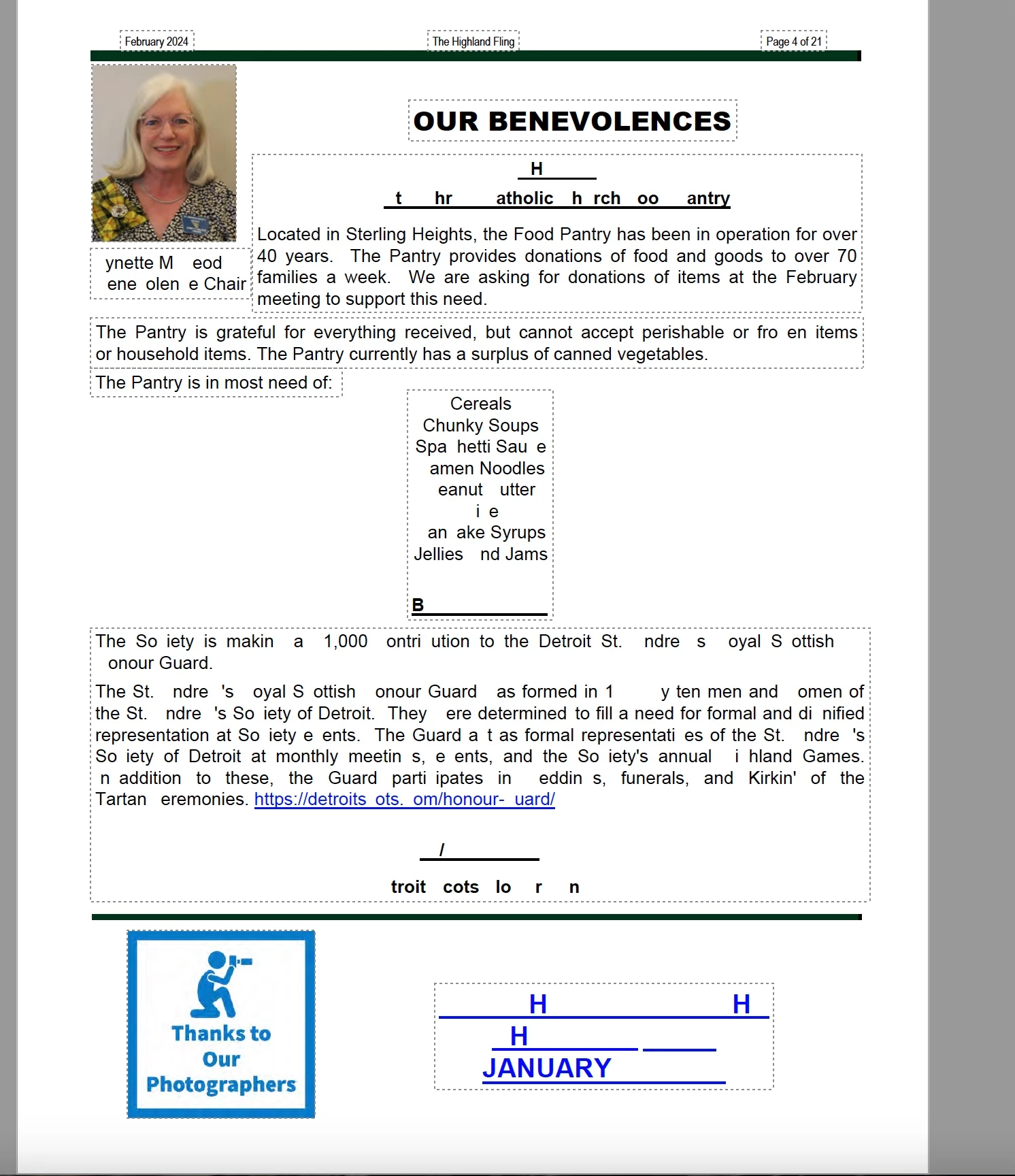
Saving document causes unreadable text
  • January 29, 2024
  • 1 reply
  • 350 views

Writing a newsletter, I have been saving the draft file for a week with no problems.  When I saved it as a final version, most of the pages' text looked like the above page.  I am able to rectify by selecting the text, making it bold, and then unbold.  I was able to save without this issue reappearing. This causes me alot of work, before I can have a finished product.  This issue has happened many times in my experience with Adobe Pro, but not every time I save a file.

This topic has been closed for replies.

1 reply

Amal.
Legend
January 29, 2024

Hi @Shelby Rohr
 
Hope you are doing well and sorry to hear that
 
Is this an issue with a particular PDF file or with all the PDFs? Please try with a different PDF file and check.
 
What is the version of the Acrobat DC you are using? To check the version go to Help > About Acrobat and make sure you have the recent version 23.08.20470 installed. Go to Help > Check for updates and reboot the computer once.
 
Also try to repair the installation from the help menu (Win Only) and see if that works.


Please try to reset the Acrobat preferences as described here https://adobe.ly/3UirROQ and check.


Regards

Amal