Saving drastically reduces file size, how to be sure that compression is 100% off?
Hi,
I'm working on a large PDF destined for printing in Acrobat XI Pro and I want to be sure that there's no compression (at least not a lossy one).
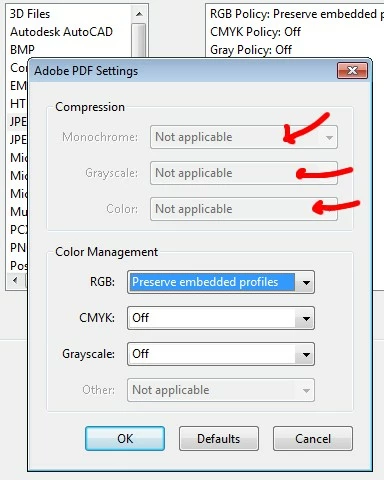
I didn't know exactly how to prevent that, so I went to Preferences>Convert to PDF and I turned on ZIP (lossless) compression for TIFF, PNG, BMP etc. But plz note that I couldn't change the JPEG settings, they are greyed out, which is another problem (plz check the screenshot below).
In the beginning, when I exported the PDF from Indesign, the file size was several gigabytes, which was ok. I made some final touch-ups in Acrobat by using some plugins and I saved the PDF. The file sizes increased, which again I didn't mind.
But then, I had to replace a couple of pages and this time the file size drastically decreased. It became like 4 times smaller.
Some say that Acrobat sometimes acts similar to Indesign, ie. it might get rid of old metadata, duplicate fonts etc... But this is a drastic change and I'm worried that the images may have been compromised, ie. compressed. And plz note that I'm not using the 'save as' command, only 'save'.
I see other people on the forum wondering why this happens, but so far I couldn't find a solution.
Thanks
 AdChoices