
stevene237136
Participant
February 7, 2017
Answered

Saving multiple PDF files to Archive format

  • February 7, 2017
  • 2 replies
  • 3949 views

Is there a way to batch multiple PDFs to save to the Archive format? My office suddenly needs to do this to thousands of files and I never even heard of this format until now.

Currently use Acrobat DC 12 for most staff. Only a few of us have Pro. Is it a Pro only feature?
This topic has been closed for replies.
Correct answer try67

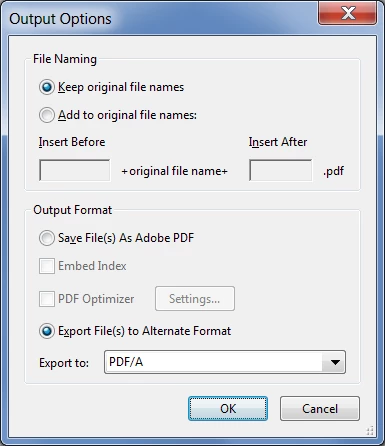
Sorry for not replying. Yes, you can do this easily in Acrobat Pro. Create an Action (via the Action Wizard) and add to it a Save command.

Click the Specify Settings button under the command and then select to export the file to PDF/A. It should look like this:

Run the Action on your files and you're done.

2 replies

stevene237136
Participant
February 27, 2017

Bump. Anyone? Is this not a common thing?

try67
Community Expert
try67Community ExpertCorrect answer
Community Expert
February 27, 2017

Sorry for not replying. Yes, you can do this easily in Acrobat Pro. Create an Action (via the Action Wizard) and add to it a Save command.

Click the Specify Settings button under the command and then select to export the file to PDF/A. It should look like this:

Run the Action on your files and you're done.

stevene237136
Participant
February 27, 2017

Thank you. This definitely helps.

try67
Community Expert
Community Expert
February 7, 2017

What do you mean by "Archive format", exactly? Do you mean PDF/A?

stevene237136
Participant
February 9, 2017

Yes that is it.