Rolandhannover
Participant
May 31, 2022
Answered

Schriftartenauswahl - wie schnell eine Schriftart aus hunderten Schriftarten auswählen

  • May 31, 2022
  • 1 reply
  • 1059 views

Hallo,
ich benutze beim Ändern von von PDFs nur vier Schriftarten. Gibt es einen Shortcut um schnell auf meine vier Schriftarten unter FORMAT zugreifen zu können. Dort sind hunderte von Schriftarten aufgelistet. Jetzt ist es so, dass ich rechts unter Format Schriftarten lange scrollen muß, um an die gewünschte Schriftart zu kommen. Es müßte doch einen Weg geben um z. B. die zuletzt genutzten Schriftarten gleich oben am Anfang des Srollmenüs abzulegen.

Danke für Antwort.
This topic has been closed for replies.
Correct answer Souvik Sadhu

Hello Roland,


I hope you are doing well. I understand that you want to keep the most used fonts at the top of the list.


Though this feature is not currently in this application version, you can try a different method to adjust a few fonts you use the most.


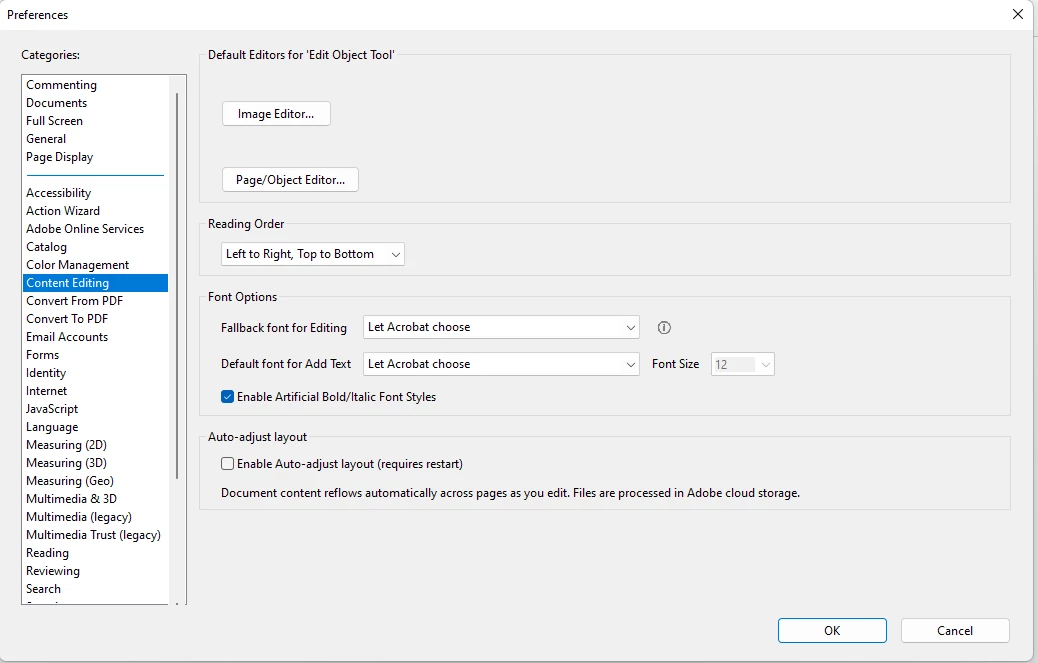
Please check the below image for reference:

To go here, please click on Edit-> Preference-> Content Editing.


You can change the default font for editing and the font used to edit texts. 


Hope this helps.


Thanks,

Souvik.

1 reply

Souvik Sadhu
Souvik SadhuCorrect answer
Legend
May 31, 2022

Hello Roland,


I hope you are doing well. I understand that you want to keep the most used fonts at the top of the list.


Though this feature is not currently in this application version, you can try a different method to adjust a few fonts you use the most.


Please check the below image for reference:

To go here, please click on Edit-> Preference-> Content Editing.


You can change the default font for editing and the font used to edit texts. 


Hope this helps.


Thanks,

Souvik.

Rolandhannover
Participant
May 31, 2022

Thanks for your help. It is not corrcctly the answer I was looking for, but it helps me to switch the fallback font to arial.

Regrads, Roland

Souvik Sadhu
Legend
May 31, 2022

Thanks for taking your time to let us know that it helped you out somehow. 


If there is some other enhancement you would like the application to feature, I suggest you fill out the feature request form so that it reaches out to our engineering team for them to look into it and implement it in the upcoming updates: Share your feedback on Acrobat DC (uservoice.com)