
Participant
September 12, 2024
Answered

Screen Display Colors wrong Adobe Acrobat Pro X version 10.1.16

  • September 12, 2024
  • 2 replies
  • 2012 views

Hi

When I open a PDF in Pro X, whether it's one that I created or one that I received from someone else, the colors display wrong.


Example of a PDF viewed in Edge...
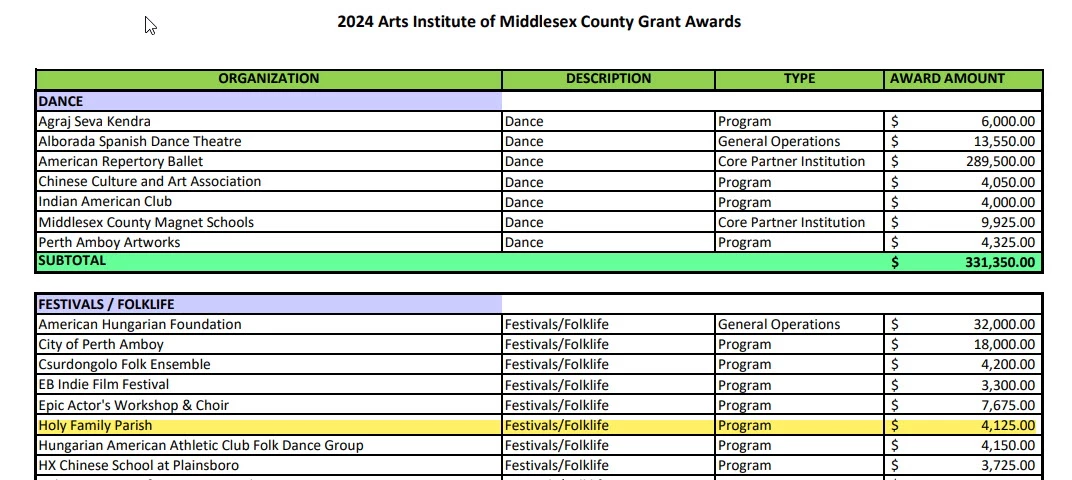
 

The same file viewed in Pro X...

 

Are there any settings in Pro X that will correct this? I tried reinstalling and that didn't work. It's been happening for a while and I don't recall making any setting/preference changes.


Thanks in advance!
Jim

This topic has been closed for replies.
Correct answer Brad @ Roaring Mouse

Glad to hear!

As for the Color management setting, Custom is not necessarily a bad thing depending on what was set for RGB and CMYK. It's not usually a good idea to use "Monitor" as your RGB space; that's more a relationship between your computer and your display. Rather, your RGB settings should be something commonly used in images you get. If you have other Adobe apps (Illustrator, etc) you should match what you have defined in there.  If you are a casual user, you might want to stick with North American General Purpose, which uses the sRGB profile. That will do you just fine as it's the default "all purpose" space of programs like Office apps and the web.

2 replies

Brad @ Roaring Mouse
Community Expert
Community Expert
September 15, 2024

Check in your Acrobat Preferences to make sure there's nothing checked in Accessibility > Change Document Colors.

Also, what are your Preferences > Color Management settings?

Participant
September 16, 2024

Hi Brad

Change Document Colors was checked. Don't know why. I unchecked it.

Color Management was set to custom, again, don't know why. I set to MONITOR.


All is looking fine now.


Thank you!

Jim

Brad @ Roaring Mouse
Community Expert
Brad @ Roaring MouseCommunity ExpertCorrect answer
Community Expert
September 16, 2024

Glad to hear!

As for the Color management setting, Custom is not necessarily a bad thing depending on what was set for RGB and CMYK. It's not usually a good idea to use "Monitor" as your RGB space; that's more a relationship between your computer and your display. Rather, your RGB settings should be something commonly used in images you get. If you have other Adobe apps (Illustrator, etc) you should match what you have defined in there.  If you are a casual user, you might want to stick with North American General Purpose, which uses the sRGB profile. That will do you just fine as it's the default "all purpose" space of programs like Office apps and the web.

Adobe Employee
September 13, 2024

Hi daring_scientist8956


Could you please share the Acrobat version you have and if possible the sample pdf file you are using.

To check the Acrobat version, please follow below steps

1. Launch Acrobat

2. Navigate to Help->About Adobe Acrobat Pro.


Regards

Ravi  

Participant
September 15, 2024

Hi Daring


I'm using Adobe Acrobat Pro X version 10.1.16.


The file is attached.


Thanks!
Jim