


Participant
October 5, 2026
Question

Screen Glitches

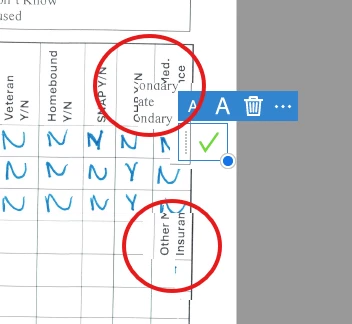
I have had a glitching problem with my Adobe Acrobat program for over a year now. Updating the program does not solve the issue. I recently upgraded to the 2026 version and the same problem continues. The only way I can temporarily solve it is by closing the application and re-opening the file that I am working on.

The issue is that while working with the text tool, or sign stamp, the program will place random stamps near where I want to edit. If I hit the save button, the program will scatter my edits on the document. 


After speaking to my coworkers, they all have the same issue. Our IT team has helped us check for updates when needed, but that is as far as they can get with assistance. 
 

    1 reply

    Participating Frequently
    October 5, 2026

    Since you and your coworkers are all seeing the same behavior, I’d look at something common in your work environment rather than the PDF itself.

    I’d compare the Acrobat build, Windows version, display scaling, and graphics driver on the affected PCs. I’d also try disabling hardware acceleration in Acrobat’s Preferences as a test, since display/rendering issues can sometimes cause annotations or text to appear in the wrong position.

    The fact that closing and reopening Acrobat temporarily fixes it is also useful. If possible, capture a screen recording when the issue happens and note whether it occurs with different PDFs.

    I’d avoid saving the document once the glitch starts, since it sounds like the misplaced edits may actually be saved into the PDF.

    Translate