



jonnaalley
Participating Frequently
April 13, 2026
Answered

Scroll bar only appears when viewing on laptop, not monitor

  • April 13, 2026
  • 2 replies
  • 32 views

Hi,

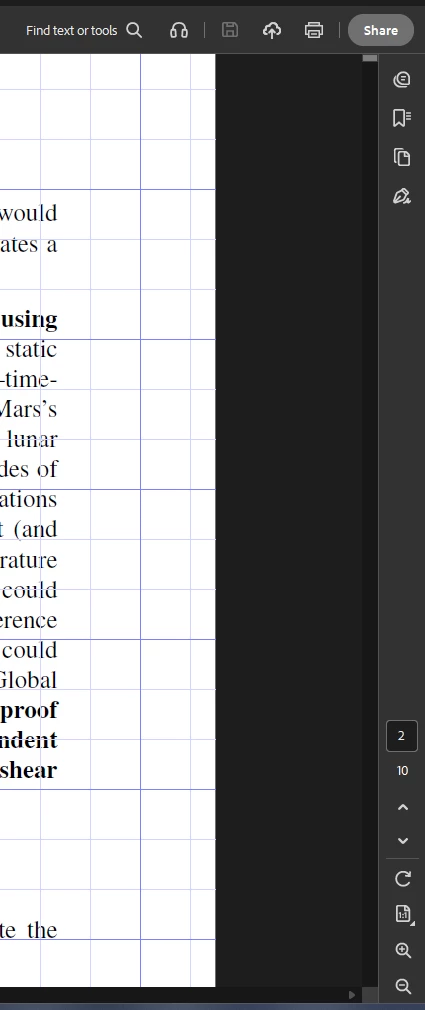
I’ve noticed a number of changes from the latest Acrobat update, including the disappearing scroll bar when viewing a pdf on my monitor, rather than my laptop. When I view a pdf on my laptop, my scroll bar will always appear. When I shift my file over to view on my monitor, the scroll bar disappears and only appears if I hover over it intentionally. Below is a screenshot of my file displayed on my monitor with no scroll bar appearing.

This is incredibly inconvenient as I merge files all the time and rely on the scroll bar to know approximately where I am in any given document. 

For troubleshooting, I updated display and view settings, continuous, single-page, the whole sha-bang, and nothing worked that would make the scroll bar appear at all times when viewing on my monitor.

Help!


    Correct answer Meenakshi0101

    Hi jonnaalley,


    Thank you for reaching out, and sorry for the trouble caused.


    Acrobat now aligns its scrolling behaviour with operating‑system–level scroll bar frameworksScroll bars may auto‑hide until you hover over them. The behavior can differ between displays, particularly when:

    • Using an external monitor behaviour.
    • Displays have different resolutions or scaling (common with laptops + monitors).

    If you’re on Windows and the scroll bar only appears on hover when using an external monitor, try the steps suggested below:

    1. Open the Windows Settings (Win + I)
    2. Go to Accessibility > Visual effects
    3. Turn Always show scrollbars ON
    4. Restart Acrobat.

    Let us know how it goes.


    Thanks,

    Meenakshi

    2 replies

    jonnaalley
    Participating Frequently
    April 28, 2026

    Thank you so much--this worked for me! This fix combined with the ruler tick mark issues resolved in the latest update have taken away all of the homicidal feelings I was having working in Acrobat the last couple months! I really appreciate the help :)

    Meenakshi0101
    Community Manager
    Community Manager
    April 29, 2026

    Hi jonnaalley,


    Glad to know the issue is fixed. Thank you for updating here.

    Let us know if we can be of any help.


    Thanks,

    Meenakshi

    Meenakshi0101
    Community Manager
    Meenakshi0101Community ManagerCorrect answer
    Community Manager
    April 20, 2026

    Hi jonnaalley,


    Thank you for reaching out, and sorry for the trouble caused.


    Acrobat now aligns its scrolling behaviour with operating‑system–level scroll bar frameworksScroll bars may auto‑hide until you hover over them. The behavior can differ between displays, particularly when:

    • Using an external monitor behaviour.
    • Displays have different resolutions or scaling (common with laptops + monitors).

    If you’re on Windows and the scroll bar only appears on hover when using an external monitor, try the steps suggested below:

    1. Open the Windows Settings (Win + I)
    2. Go to Accessibility > Visual effects
    3. Turn Always show scrollbars ON
    4. Restart Acrobat.

    Let us know how it goes.


    Thanks,

    Meenakshi
