

Niko+Sanchez
Participant
June 25, 2026
Answered

Se me bloquea Adobe Pro

  • June 25, 2026
  • 1 reply
  • 19 views

Hola! Tengo Adobe pro y cada vez que lo abro se me tilda de esta manera. Ya lo desinstalé y volví a instalar, pero me sigue haciendo lo mismo. Lo utilizo mucho para poder estudiar en la universidad, por eso uso la versión paga y encima me anda mal.

 

    Correct answer kglad

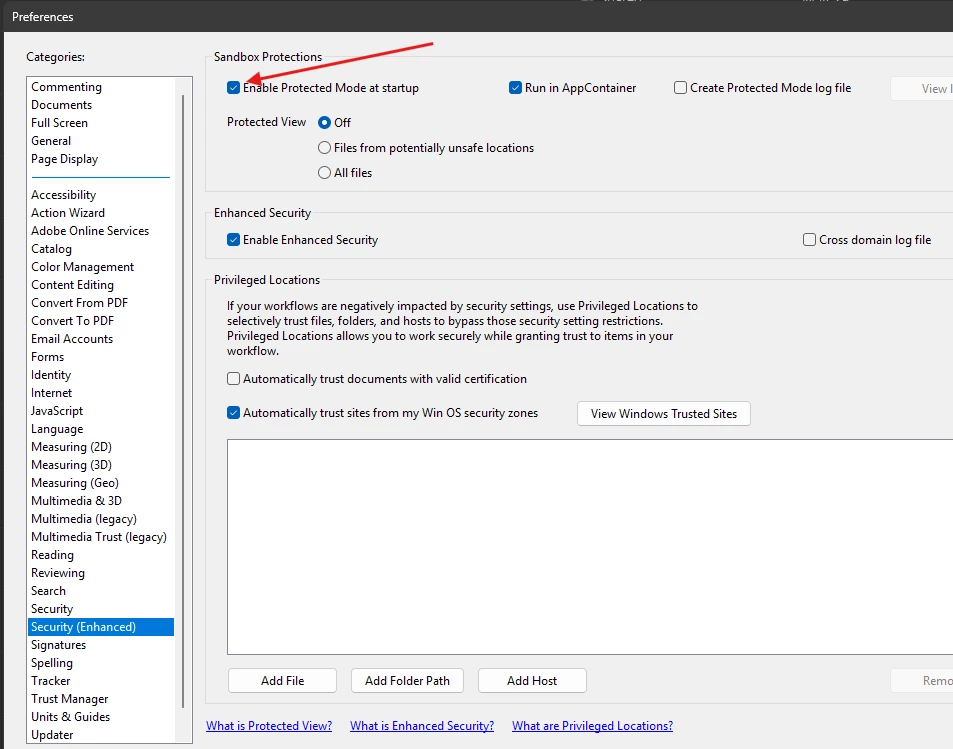
    Go to Edit > Preferences > Security (Enhanced) and temporarily uncheck "Enable Protected Mode at startup". Restart the app to see if it unfreezes


    1 reply

    kglad
    Community Expert
    kgladCommunity ExpertCorrect answer
    Community Expert
    June 25, 2026

    Go to Edit > Preferences > Security (Enhanced) and temporarily uncheck "Enable Protected Mode at startup". Restart the app to see if it unfreezes


    Niko+Sanchez
    Participant
    June 29, 2026

    Esto no lo puedo hacer porque como dije, cuando abro Adobe PDF Pro me queda la pantalla del programa en negro como se ve en la imagen, es decir que se bloquea y no me deja hacer nada.

    Anand Sri Bhattacharya
    Community Manager
    Community Manager
    June 29, 2026

    Hello ​@Niko+Sanchez 


    I hope you are doing well, and we are sorry for the trouble you had.

    Could you please share more details about the issure? Are you on a Mac or Windows machine, and what is the OS version?

    What is the version of Acrobat installed? To check go to Meu (Win) | Acrobat(Mac) ? Help > Check for About Adobe Acrobat. If the app does not allows you to navigate to these menu due to the black screen. 

    Please enable the root user account, and check the app’s performance. 

    If the issue still continues, please collect the logs from the machine, and share them with us for further investigations. To collect the logs, check this article: https://helpx.adobe.com/acrobat/kb/acrobat-diagnostics.html


    Let us know how it goes, and share your findings.

    Regards,

    Anand Sri.