
Participant
February 28, 2024
Answered

Security Local Host

  • February 28, 2024
  • 1 reply
  • 912 views

Hi, I have created a form using Adobe Acrobat and Indesign which I have exported as a PDF to upload to a website for users to download. However, when they download the form and click on 2/3 of the boxes a security warning comes up saying: 


"This document is trying to connect to file://localhost

If you trust this site, choose Allow. If you do not trust this site, choose Block". 


It only seems to come up on the 3 big Text Fields ones I've used. Can anyone help? 


Kind regards


Chris
This topic has been closed for replies.
Correct answer Karl Heinz Kremer

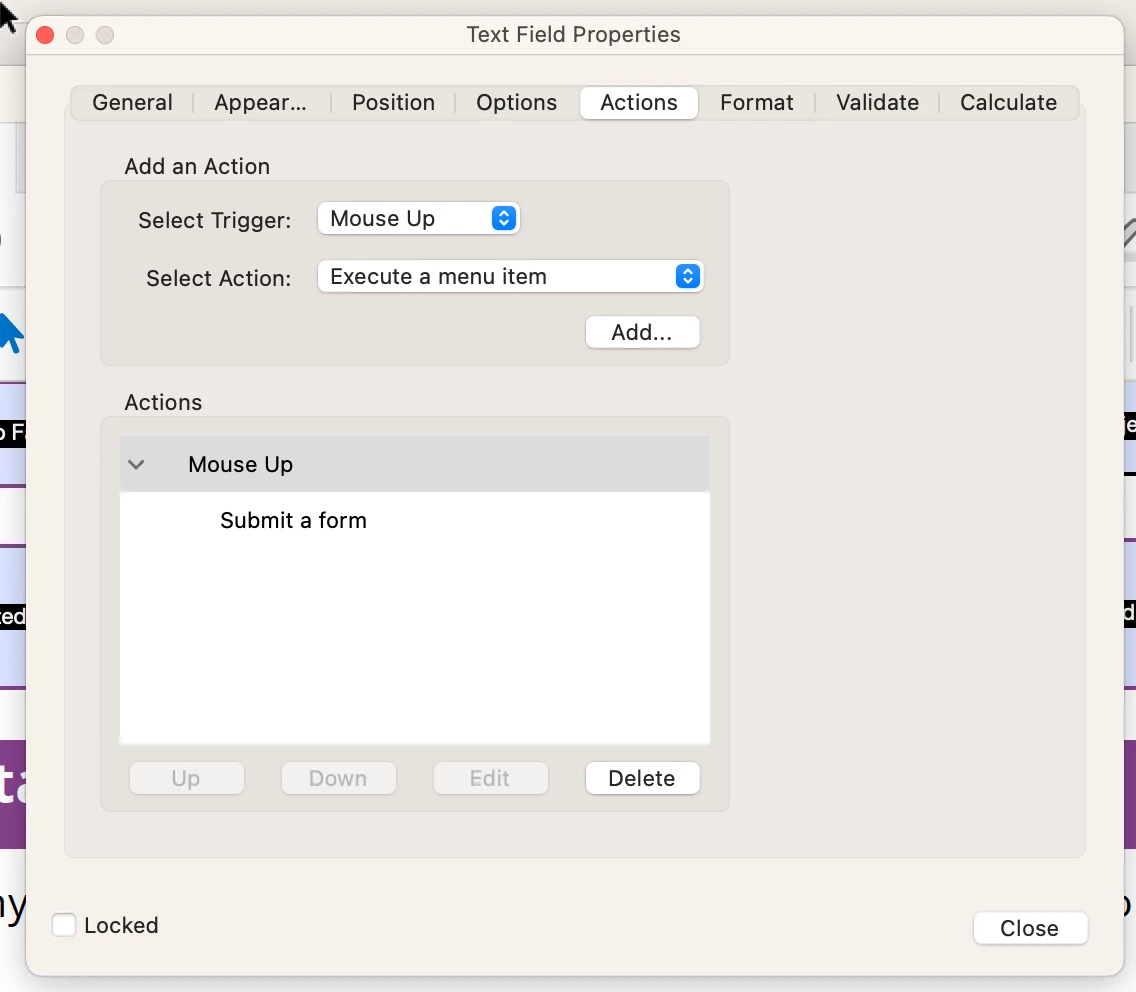
The fields that create this popup have a "submit form action" configured for the "mouse up" event, but without any other settings specified, so this would not do anything anyways. You can remove this:


Bring up the form fields properties for the fields in question, and then select the "Actions" tab, then select the "Mouse Up" or "Submit a form" line from the list and click on the "Delete" button. Do this for all the fields that give you this problem.


Save your file and you should not have to deal with this probem anymore. I suspect that this is something that InDesign put into the form fields. 

1 reply

Karl Heinz  Kremer
Community Expert
Community Expert
February 28, 2024

Without seeing the document, it is impossible to say why this is happening. 

Can you share your file? If not, can you go through the same process (InDesign and Adobe Acrobat) and create a sample document that has the same functionality as these three text fields in question are concerned? 


Participant
February 28, 2024

Hi, 


Thanks for the reply. I've attached an example form. The boxes which just ask for generic information - name, address etc seem to be working fine. But the bigger boxes specifically Section 3 and 4, give the error message and occasionally Section 5. 


Karl Heinz  Kremer
Community Expert
Karl Heinz KremerCommunity ExpertCorrect answer
Community Expert
February 28, 2024

The fields that create this popup have a "submit form action" configured for the "mouse up" event, but without any other settings specified, so this would not do anything anyways. You can remove this:


Bring up the form fields properties for the fields in question, and then select the "Actions" tab, then select the "Mouse Up" or "Submit a form" line from the list and click on the "Delete" button. Do this for all the fields that give you this problem.


Save your file and you should not have to deal with this probem anymore. I suspect that this is something that InDesign put into the form fields.