
Participant
February 12, 2020
Answered

Seeking help for exporting actions from PPT to Adobe.

  • February 12, 2020
  • 2 replies
  • 1837 views

Alright folks, I have a PPT deck that I converted to PDF. During the conversion, "actions" I had associated with text and icons within my PDF were lost. These were simple actions, for example, if the user clicked on an icon in the bottom of each screen, they were taken back to a home page. Essentially, a home button. So this home button was on all 200+ pages of my PPT and while the icon itself shows up in Acrobat Pro, the action was lost.


So my questions are:

  1. Is there a way to use Adobe's "Create Link" tool on a mass scale so I don't have to do it for all 200+ pages?
  2. Is there an equivalent "Master Slide" view in Adobe like there is in PPT?
  3. Is there a way to preserve actions during the conversion from PPT to PDF?


Thank you in advance!
Correct answer Bevi Chagnon - PubCom.com

Quote: << Is there a way to use Adobe's "Create Link" tool on a mass scale so I don't have to do it for all 200+ pages?>>

Not that I know of. Someone might be able to write a script to do that task.


Quote: << Is there an equivalent "Master Slide" view in Adobe like there is in PPT? >>

No. Once the PDF is made, that type of feature is no longer available because it's something specific to PowerPoint.


Quote: << Is there a way to preserve actions during the conversion from PPT to PDF?>>

Yes, but it depends on which method you use to export the PDF from PowerPoint, and the conversion settings you choose.


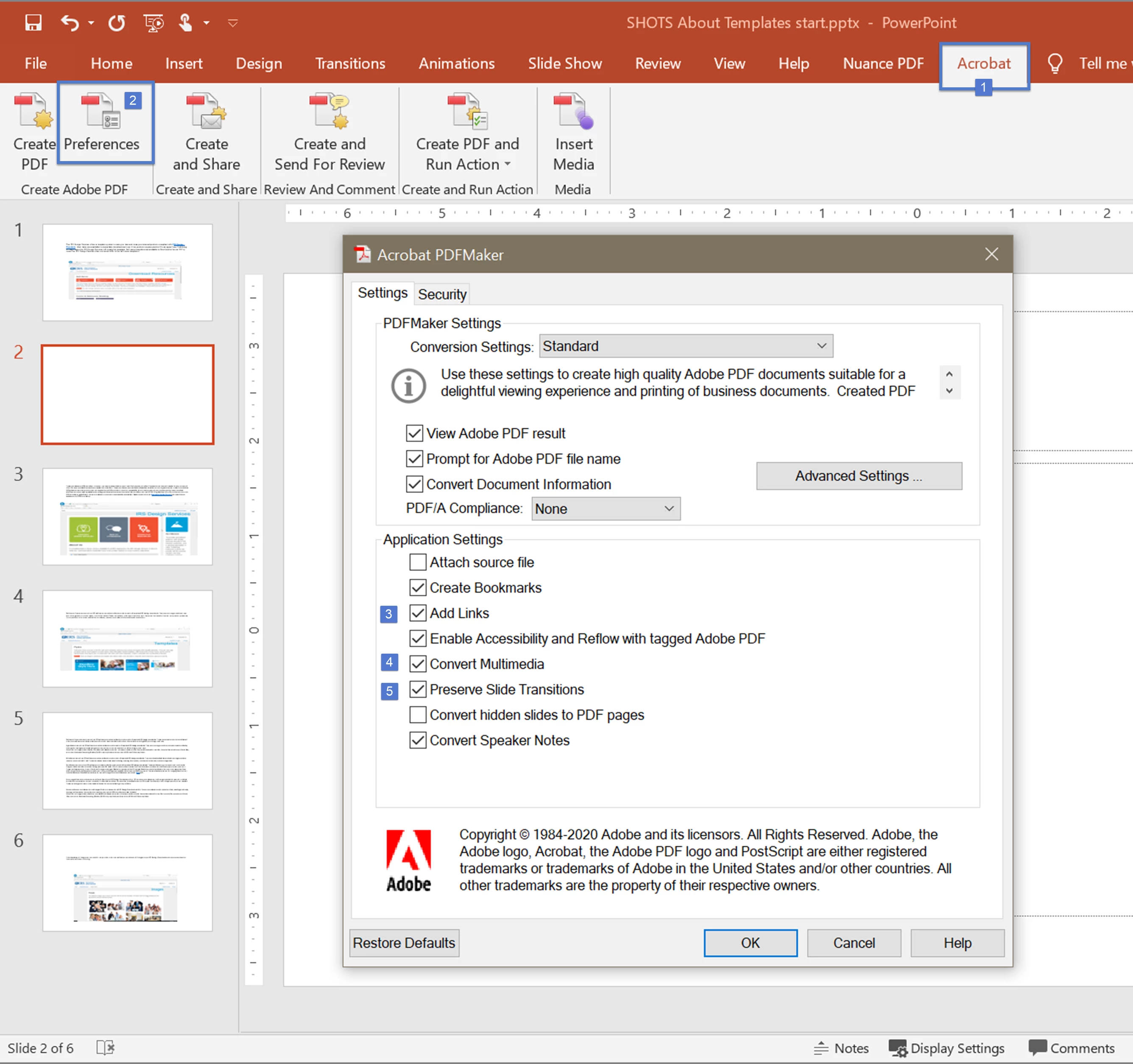
Using the PDFMaker plug-in (the Acrobat Ribbon that is installed into PPT with Acrobat Standard and Pro), click the Preferences icon and adjust the settings shown below. You want to retain the interactivity in the PDF.


2 replies

try67
Community Expert
Community Expert
February 12, 2020

1. You can create a button field that does that and then duplicate it across all pages with just a couple of clicks, yes.

Bevi Chagnon - PubCom.com
Legend
February 12, 2020

Quote: << Is there a way to use Adobe's "Create Link" tool on a mass scale so I don't have to do it for all 200+ pages?>>

Not that I know of. Someone might be able to write a script to do that task.


Quote: << Is there an equivalent "Master Slide" view in Adobe like there is in PPT? >>

No. Once the PDF is made, that type of feature is no longer available because it's something specific to PowerPoint.


Quote: << Is there a way to preserve actions during the conversion from PPT to PDF?>>

Yes, but it depends on which method you use to export the PDF from PowerPoint, and the conversion settings you choose.


Using the PDFMaker plug-in (the Acrobat Ribbon that is installed into PPT with Acrobat Standard and Pro), click the Preferences icon and adjust the settings shown below. You want to retain the interactivity in the PDF.


|&nbsp;&nbsp;&nbsp;&nbsp;Bevi Chagnon &nbsp;&nbsp;|&nbsp;&nbsp;Designer, Trainer, &amp; Technologist for Accessible Documents ||&nbsp;&nbsp;&nbsp;&nbsp;PubCom |&nbsp;&nbsp;&nbsp;&nbsp;Classes &amp; Books for Accessible InDesign, PDFs &amp; MS Office |
Participant
February 19, 2020

I didn't have access to the preferences option but clicking "Create PDF" retained the interactivity I was looking for. Thank you!