
carriel80466725
Participant
November 12, 2018
Question

Selecting Text in Adobe Acrobat

  • November 12, 2018
  • 1 reply
  • 534 views

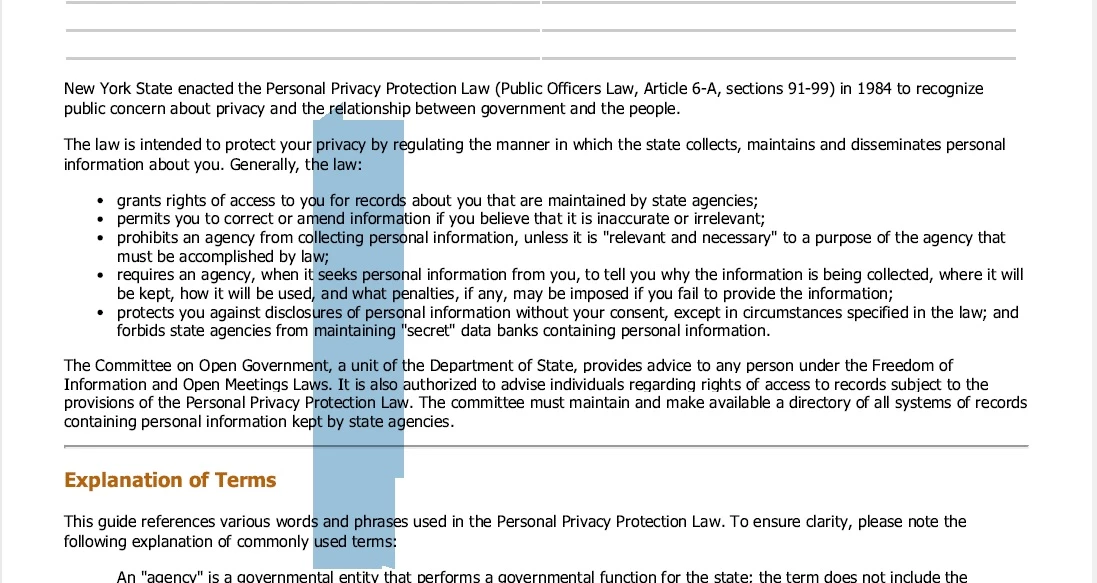
When I go to select text in Adobe Acrobat for whatever reason (to copy, highlight, etc.), I keep getting an oversized cursor that really doesn't copy anything.  See screenshot.  How do I just select text the good 'ol fashioned way with a normal size cursor?  
This topic has been closed for replies.

1 reply

Adorobat
Participating Frequently
November 13, 2018

Hi carriel,

As per the issue description mentioned above, cursor size is big when trying to select text in a pdf, is that correct?

Could you try printing the pdf file to Adobe PDF printer as the following thread suggested and check if that helps:

Re: Reduce cursor size in Adobe Reader DC and X Pro

Let us know if you need any help.

Shivam