Participant
October 23, 2017
Answered

Selecting text within a highlight

  • October 23, 2017
  • 3 replies
  • 12261 views

This post is feedback for Adobe. Unfortunately, Adobe's aggressive attempts to answer questions from users who need help, without them seeking to get in contact with a real live human being, prevents it from receiving feedback at all.

I've been using Acrobat for two decades and it has this bizarre limitation: if you select some text and mark it as a highlight, it becomes really difficult to then select that text to copy and paste it into another document. Once it is highlighted, clicking on the text appears to select the whole highlight, but if you hit ctrl-C or copy, nothing happens. The only way to select that text for copying is to start your selection outside the highlight, e.g. intentionally select a word you didn't want to copy.

I signed up for Creative Cloud, it updated to Adobe Acrobat Pro DC, I made a highlight, I clicked it and tried to copy it... STILL THIS PROBLEM!??

I'm really just kicking the tyres of this new edition. Acrobat has long been abandoned from my workflow. I might use it to fill out a form, occasionally -- the only thing that Preview.app doesn't do very well. Preview is just a much saner alternative for reading and marking up PDFs. Acrobat Pro DC has all these buttons for simple tasks, mimicking tools like Smallpdf.com -- but the overall reading and annotation experience remains deeply irritating.

And when I try to give feedback, Adobe insists I'm the one who needs help. Yeah, nah.
Correct answer Document Geek

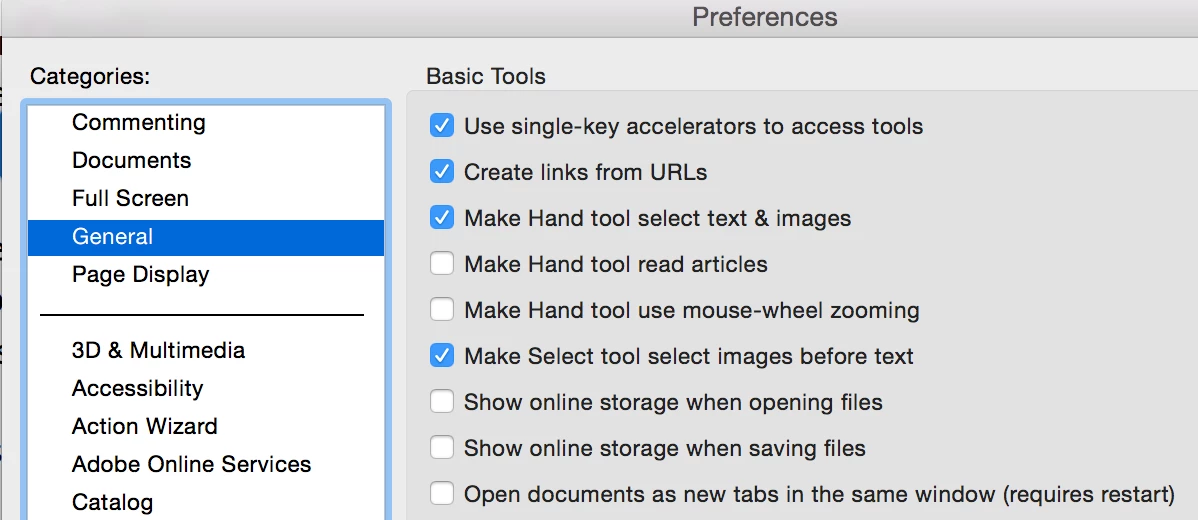
Just highlighting text won't copy it. You need to set your profaners to use the Hand Tool to select text.

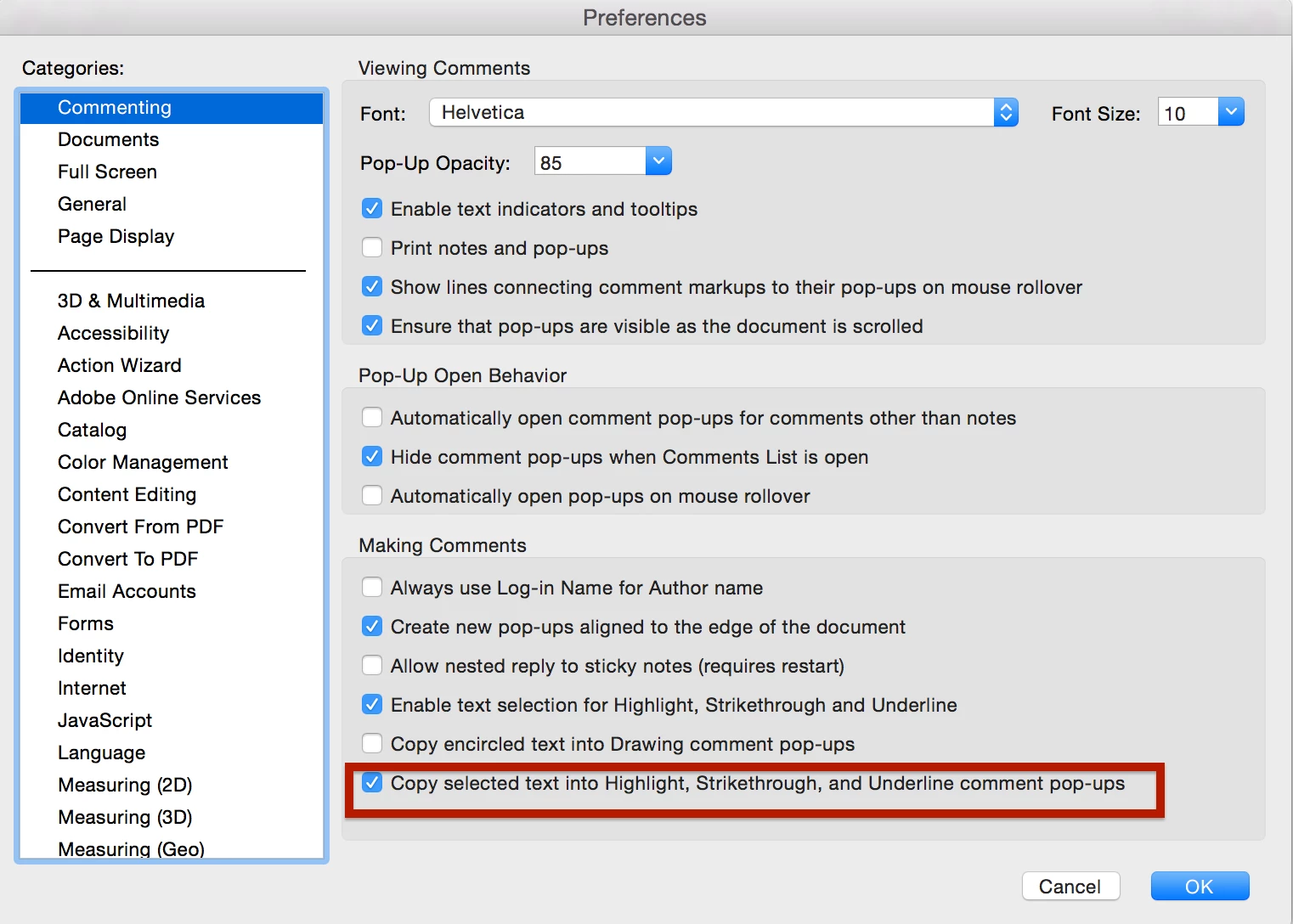
You can also set the highlighter tool to copy the highlighted text into the comment pop up, where you can then copy it out of the pop-up note.

3 replies

Participant
May 20, 2024

Wow! big sarcastic slow hand clap to adobe.  Its been seven years and you still cannot copy already highlighted text.  Adobe why do you think a person might highlight text in a pdf? I would bet that one of the top reasons would be to later use that text in something else.  You know what would make that infinitely easier?  It would be if this basic and completely reasonable function would actually function.  Maybe in another 7 years after 5 more pointless UI updates that just hide the tools you have been using for years we might get this basic functionality added.

Amal.
Community Manager
Community Manager
June 4, 2024

Hi there


Hope you are doing well.


Would you mind sharing the version of the OS and the Acrobat DC you are using? To check the version go to Help > About Acrobat and make sure you have the recent version 24.02.20759 installed. Go to Help > Check for updates and reboot the computer once.

What is the workflow/steps you are doing to copy the text? A small video recording of the same would be very helpful.


Also go through the steps shared here https://adobe.ly/3X8mG5u and see if that works.


~Amal

Participant
June 6, 2024

I am using Windows 10 pro.  Acrobat version 24.02.20759 64 bit.


I tried for way too long to capture a video of this and ultimately the thing didn't capture the important bits.  If adobe is going to expect people to make screen caps they ought to explain how.  It feels like a way to make the barrier to getting help so high that people don't bother.


My work flow described since I cant get the video to work.  I read alot of cases.  I frequently highlight a paragraph.  Later when drafting documents I will want to include a portion of that highlighted paragraph.  However dispite having the pointer tool selected as soon as I go over that highlighted paragraph the only options I get appear in a small black box below the pointer.  It gives the option to comment on the highlighted paragraph, change the color of the highlighting, or delete the highlighting.  I can also copy the entire highlighted praragraph but thats not really the point is it.


The point is that highlighting a pdf should not then make it more difficult to use that pdf and in particular the text you have identified as worthy of highlighting.  


I have since learned that if I right click the highlighted paragraph I can select an option called Enable Text Selection which does allow me to select only a portion of the highlighted text.  However this seems to need to be selected e v e r y  s i n g l e time, which is incredibly irritating.


I imagine that you might be able to direct me through 19 different levels of settings that may sort of make this the default option.  Fine, great, send me that if you have it.  But the point is this, I have to use pdf's every day.  I have been using acrobat for probably over a decade and I hate it.  It is hard to figure out basic functions.  It is difficult to get support.  Rather than making things more user friendly the product moved to more expensive subscription models and when there are updates they are frequently big UI changes that slow down people's work flow with no new utility.


I just wish this wasn't such an awful chore to get the mind numbingly simple function of selecting text from within a highlighted portion of the pdf.  It seems simple.  It seems obvious.

Participant
March 8, 2020

Press shift and select text

Participant
June 7, 2020

shift+double click will select a word

Document Geek
Community Expert
Document GeekCommunity ExpertCorrect answer
Community Expert
October 25, 2017

Just highlighting text won't copy it. You need to set your profaners to use the Hand Tool to select text.

You can also set the highlighter tool to copy the highlighted text into the comment pop up, where you can then copy it out of the pop-up note.

Participant
April 26, 2018

I totally agree with the OP that this behavior is counterintuitive (in my case, the text is highlighted so I can copy it!), and it actually impedes my workflow. I am reviewing marked-up page proofs and need to select text within the highlighted area in order to plug it into the search bar of my layout software so I can quickly find where to make the correction. My workaround: I have found that when the the highlight boundary is selected, I can delete the highlight and then select the text within the highlighted area that I need, and then undo the deletion (if I remember to undo) to maintain the markup intact for future review. But having to use this workaround is sloppy, and it's long past time they fixed this. I, too, wish Adobe was better at listening to their customers.

To the respondent: so if the person doing the markup didn't know to select that particular box on the preferences, I'm just out of luck?