
Participant
April 2, 2021
Answered

Send for Signatures hangs at 72% (still)

  • April 2, 2021
  • 22 replies
  • 58401 views

We are still having issues where Adobe Acrobat Pro DC 2021.001.20145  hangs at 72% when sending for signatures regardless of repair, updates, uninstall and reinstall.  I need a fix for this!

I'm attaching the System Report for review.  
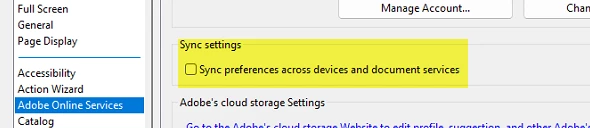
Correct answer LCAadmin

Turned this settting off, fixed my issues for useres.


22 replies

Participating Frequently
November 4, 2021

Our organization also has this issue. I have an open ticket with Adobe and they have seen the issue. I don't think anyone has a solution because so far we've been instructed to try several things from reinstalling to rolling back to earlier versions. One fix seemed to work, but only for a day and that was to go to Preferences/Signatures/Creation & Appearance and uncheck "Use modern user interface...". It seemed to work, but after a reboot or the next day, even with it still unchecked, the system didn't work like it should, getting hung up at the 72% mark.

Participating Frequently
November 30, 2021

I opened a ticket with Adobe and over the past month have had several meetings. They continue to work on a solution, having us try new build increments, but so far none have fixed the issue.

Amal.
Legend
April 5, 2021

Hi PhilipL


Hope you are doing well and sorry for the trouble. As described Adobe Acrobat Pro DC 2021.001.20145 hangs at 72% when sending for signatures and you have already tried repair, updates, uninstall and reinstall with no success.


Please try to logout of the Adobe Acrobat Pro DC application, reboot the computer once and relogin and check if that helps.

Also, please try to send the documents for signature online using the link: https://documentcloud.adobe.com/link/home/ and see if that works for you.


Regards

Amal


Participant
May 29, 2021

Hi Amal,


This fix does not work. I am having the same issue with the upload stalling at 72%. Any suggestions?


Jim

Amal.
Legend
June 3, 2021

Hi there


Please try to send the documents for signature online using the link: https://documentcloud.adobe.com/link/home/ and see if that works for you as suggested earlier.


Regards

Amal