
Inspiring
March 15, 2025
Answered

Set all my PDFs to enable scrolling by default and use Pan tool / Hand tool

  • March 15, 2025
  • 5 replies
  • 3804 views

How do I set all my PDFs to enable scrolling by default in Acrobat Pro? In Version 2024.005.20421 | 64-bit, I need to go through these steps for every PDF, which is extremely annoying as the keyboard shortcuts do not work in my version of Acrobat and so I need to go through 4 clicks for every new PDF:   

  • Menu | View | Page Display
  • Click Enable Scrolling


Also, how do I toggle between the arrow and the hand tool / pan tool in Acrobat Pro? There used to be a simple select icon in Acrobat X Pro but it seems to have been removed in Acrobat 2024.


Finally, how do I get messages emailed to myself? I tick the option to enable messages to be emailed to me but they never are. 
Correct answer ChristineW19

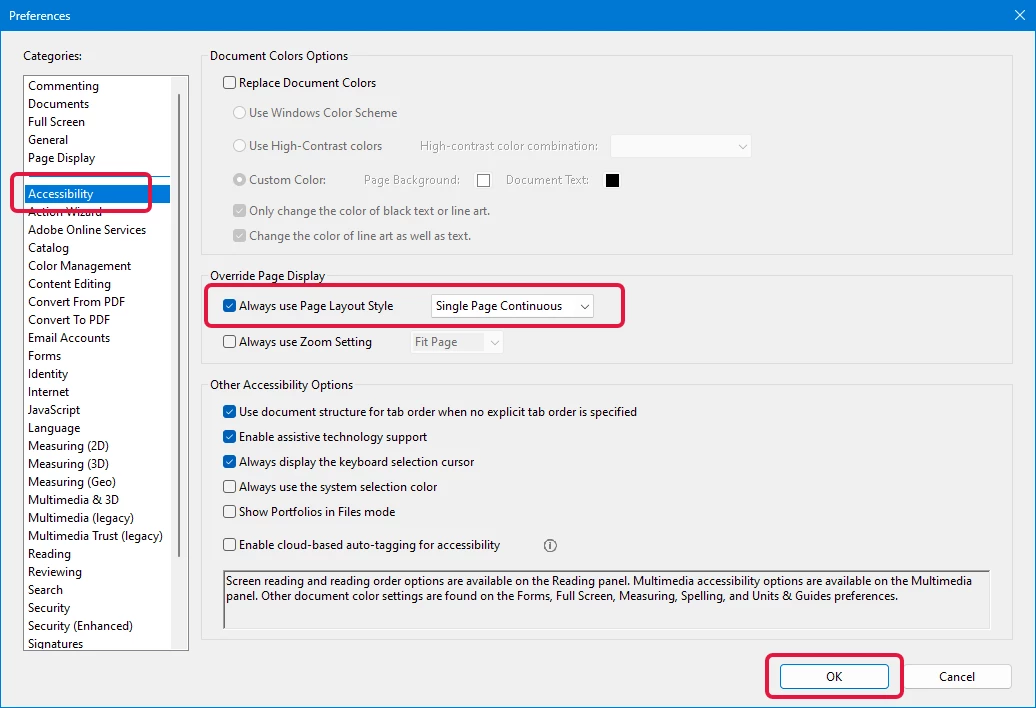
For continuous page scrolling as your default, go to Edit > Preferences > Accessibility.  For "Always use Page Layout Style," select Single Page Continuous from the drop-down and click OK.  You MUST completely close Adobe Acrobat and then reopen it, and then that setting will be applied as your default.  


For the "hand and arrow" tools.  Move your cursor to the bottom of the PDF document and you should see a toolbar appear.  Click the button on the right to dock it to the toolbar at the top.  And then you'll always have the "hand and arrow" buttons available to you.


5 replies

Participant
October 8, 2025

Try this fix that worked for me. Prior to this, even when I changed the Accessibility and Page Display to "single continuous" it would get ignored. But, this worked!


To enable continuous scrolling by default in Adobe Acrobat, go to Edit > Preferences > Accessibility, select Always use Page Layout Style and choose Single Page Continuous, then go to Edit > Preferences > Documents and uncheck Restore last view settings when reopening documents. These settings ensure that PDFs will open in continuous scrolling mode and that this setting isn't overridden by individual document settings

ChristineW19Correct answer
Participant
August 27, 2025

For continuous page scrolling as your default, go to Edit > Preferences > Accessibility.  For "Always use Page Layout Style," select Single Page Continuous from the drop-down and click OK.  You MUST completely close Adobe Acrobat and then reopen it, and then that setting will be applied as your default.  


For the "hand and arrow" tools.  Move your cursor to the bottom of the PDF document and you should see a toolbar appear.  Click the button on the right to dock it to the toolbar at the top.  And then you'll always have the "hand and arrow" buttons available to you.


Participant
April 1, 2025

i've been  battling this for a while now - here's the issue, there is no place that under preferences that let's you "enable scrolling". Instead you have to set it to "single page continuous", under the page layout option (menu, preferences, page display) i've attached a screen shot. 

jmt111Author
Inspiring
April 6, 2025

I reverted back to legacy Acrobat by choosing Disable new Acrobat because it was taking too much time to learn all the new features. This has worked for me to enable scrolling by default:

  • Edit | Preferences | Page Display
  • Choose Single Page Continuous


I have ticked "Email me when someone replies" but I never get replies emailed to me and they are not in my June Email. Does the "Email me when someone replies" setting work for others?

JR Boulay
Community Expert
Community Expert
March 28, 2025

"I need to go through 4 clicks for every new PDF:   

  • Menu | View | Page Display
  • Click Enable Scrolling"

You should set this as a quicktool: https://helpx.adobe.com/acrobat/using/workspace-basics.html#quick-actions-toolbar


"Also, how do I toggle between the arrow and the hand tool / pan tool in Acrobat Pro? There used to be a simple select icon in Acrobat X Pro but it seems to have been removed in Acrobat 2024."

Preferences: General: Use single-key accelerator to access tools


"how do I get messages emailed to myself? "

Check your spams folder.

Acrobate du PDF, InDesigner et Photoshopographe
try67
Community Expert
Community Expert
March 16, 2025

You can change the properties of the files themselves via Menu - File Properties - Initial View, or you can change the default viewing option in the application via Menu - Preferences - Page Display.

jmt111Author
Inspiring
March 28, 2025

I have no option for File Properties under Menu.


I tried to change the default viewing option in the application via Menu - Preferences - Page Display, but scrolling is still always disabled by default.


How do I get responses to this thread to be emailed to me? I have ticked "Email me when someone replies" but I never get replies emailed to me.
