
Participant
March 4, 2014
Answered

Set Default Font Formatting for "Add Text" Content Editing Tool (Adobe Acrobat Standard XI)

  • March 4, 2014
  • 37 replies
  • 68460 views

We recently upgraded to Adobe Acrobat Standard XI.

Our users take system generated PDFs and customize them by adding additional text and images. They generally always use specific font formatting options when adding their text.

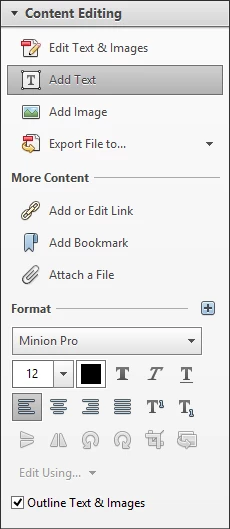
Unfortunately, we haven't been able to figure out a way to set the default font formatting options when using the "Add Text" Content Editing Tool. You are always stuck with the Minion Pro font at 12 point.

Therefore, each time the user adds new text, they must select the text that they just added, and then change the font formatting options from within the Content Editing tools pane. It would be really useful to be able to set the default font formatting options once and all new text added would use those settings.
Correct answer AnkitBal

AnkitBal — The Acrobat DC behavior is very strange. It does not seem to remember when I set the font, and in fact, when I add text near other text, it seems to want to use the nearest font. For example, I opened a pdf with a title in Chiller, and when I went to add text, it automatically set the font to Chiller. We are looking for a way to set a default across every document and regardless of other fonts in the document.


Hi,

We have added the functionality in Acrobat DC to pick up the nearest font of the neighbor during "Add Text", as a user would be adding text that would be in style with the existing content, and that manually replicating existing values is a tedious exercise. However, once the user changes the font or its size, Acrobat remembers the changes for the rest of the edit session for the document. Does that work out for you?

You have also requested for a default font and size setting across all documents and Acrobat sessions, set manually by the user. Is that correct? If so, unfortunately, that is not possible presently, but we can take this in as your feedback and evaluate it for our future releases.

Regards,

-Ankit Bal

37 replies

October 7, 2015

I can assure you that Minion Pro 12 hasn't been the nearest neighboring font in the hundred or so documents that I've edited since Adobe Acrobat Pro DC was installed on my computer. What this tells me is that Minion Pro 12 is a default when Acrobat can't figure out the neighboring font. This is why we need the ability to set our own default. Please add this function.

LacyinTX
Participating Frequently
October 7, 2015

Try this:

Right click on the toolbar and choose "Customize Quick Tools". A list will appear.

Click on "Comment". This will open up another list of the tools associated with "Comment" options for adding comments to the pdf.

Click to highlight the plain "T". This is the "add text comment" tool.

Click the plus sign to the right of the list. This adds the quicktool to the toolbar so that it is always accessible.

Click save and the tool will now be permanently on your toolbar at the top of the page.

It is important to use the "Add Text Comment" tool that is found under Comments (Not the Add Text tool under Edit PDF... that is confusing, but it is what it is). The "Add Text Comments" tool will retain your formatting once you set it.

Thanks to try67 for pointing this tool out to me. It has been a life saver!

Participant
March 26, 2020

Thank you! I have always used the Add Text option and it drove me crazy that I had to change the formatting AFTER   adding it and that it would default back after every box. This solves a major first-world problem for me after suddenly having to work from home and not able to process my AP invoices in the usual way. Major time and headache saver!

Adobe Employee
December 10, 2014

Hi,

Unfortunately, it is not possible to change the default font option. I would suggest you to fill our feature request form, which will be sent directly to our development team:-

https://www.adobe.com/cfusion/mmform/index.cfm?name=wishform&loc=en

Regards,

Nakul

AnkitBal
Adobe Employee
Adobe Employee
June 25, 2015

Hi,

Have you tried Acrobat DC? Changes have been made to the "Add Text" behavior where it remembers the changes to the font and its properties, in the context of the document.

Please try it out and let us know of your feedback.

Regards,

-Ankit Bal

Participating Frequently
June 29, 2015

AnkitBal — The Acrobat DC behavior is very strange. It does not seem to remember when I set the font, and in fact, when I add text near other text, it seems to want to use the nearest font. For example, I opened a pdf with a title in Chiller, and when I went to add text, it automatically set the font to Chiller. We are looking for a way to set a default across every document and regardless of other fonts in the document.

Participant
September 19, 2014

I have noticed the same impediment.  However, Adobe InDesign CC has a method for changing default font for "character".  Open an empty screen, select a font.  Close InDesign.  The next time InDesign is opened, the new selected font appears.  So, Adobe does have an InDesign method.  Perhaps in the next edition Acrobat XII will have this InDesign method.

Participant
September 8, 2014

Does anyone has an answer to this?

Participant
April 4, 2014

This is absolutely a necessary feature.  Has anyone found a work around?

Participant
May 13, 2014

Ditto - need this feature now