TheLithiumKid
Known Participant
February 8, 2017
Answered

set password on multiple PDF'S at the same time

  • February 8, 2017
  • 2 replies
  • 9093 views

we are using adobe pro XI,

the users are required to set passwords on PDF's that they are working on.

under the windows file system, is it possible to set all pdfs under a folder with the same password?

at the moment that have to set each one individually, but ideally the would like to ba able to batch set 60+ PDFS with the same password.

is that possible?

Thanks

This topic has been closed for replies.
Correct answer Dave__M

Hi,

that works fine, takes a bit of getting used to, but it works.

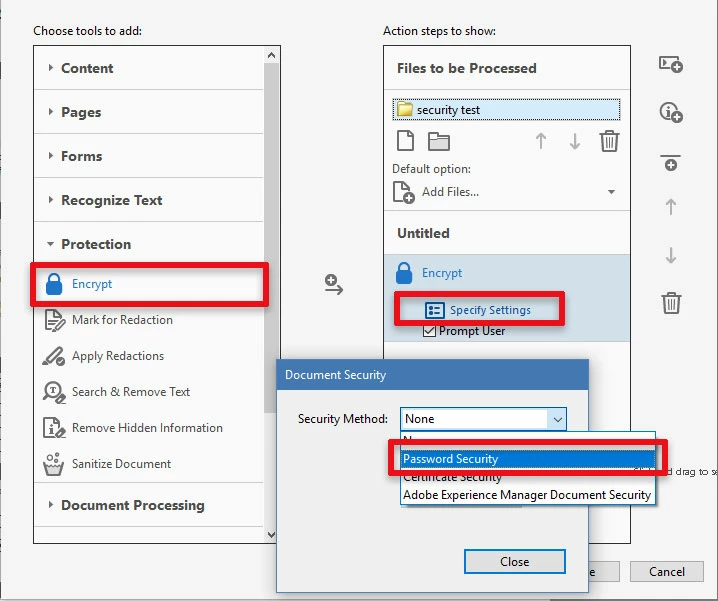
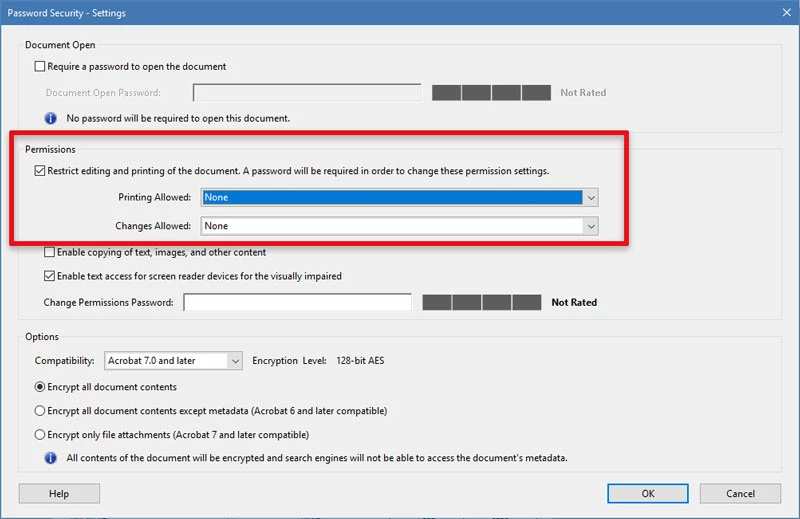
do you know, if it possible to set the PDF, to stop users from printing it, using the above?


You can create your own actions from scratch.  From the Action Wizard, click New Action.  You can customize how and what files you process with the action, including designating a specific files full of PDF files.

I hope it works as you would like - let me know!

My best,

Dave

2 replies

TheLithiumKid
Known Participant
April 21, 2017

Hi

One last question. so encrypting and locking down PDFS is fine.

but how do i undo a batch lock down on PDFS on my share? ie they would be locked by me, and i would have the password....

thanks

Dave__M
Community Expert
Community Expert
February 8, 2017

I have not tried to use this, but on the Acrobat Action Exchange page, located here:

https://acrobatusers.com/actions-exchange?trackingid=JZXYQ

You should find a downloadable action called "Protect PDF from Editing".

I do not know if this is compatible with your version, but I believe it would be.  It is configurable, so if it does not do exactly what you want, you should be able to tweak it.

My best,

Dave

TheLithiumKid
Known Participant
February 8, 2017

Hi,

that looks promising, but where do i get the file "Protect PDF.sequ", that i need to open in the attacment on the first step?

cant find it anywhere....

Thanks

Dave__M
Community Expert
Community Expert
February 8, 2017

The file is an attachment to the PDF.  Look for the paper clip icon on the left & click.

My best,

Dave