
Participant
October 24, 2024
Answered

Set value of a textbox if a dropdown value has certain value

  • October 24, 2024
  • 1 reply
  • 1085 views

Using Acrobat Pro, I have a dropdown field called Program. User will select from three options

  1. Choose One (this is default to prompt user to select something)
  2. SNAP
  3. TANF


I then have Textbox field that is called programLong. I want this field to auto update to the long names for each or be blank if option 1 is not changed.

Here is my code that will only update the programLong filed if I preview and then click Edit. It will not update when the dropdown field changes values.


var progValue = this.getField("Program").value;
if (progValue == "SNAP") {
event.value = "Supplemental Nutrition Assistance Program (SNAP)";
}
else if (progValue == "TANF"){
event.value = "Temporary Assistance for Needy Families (TANF)";
}
else if (progValue == "Choose One"){
event.value ="";
}
This topic has been closed for replies.
Correct answer ls_rbls

+++EDITED REPLY... I made a mistake


Hi there @David38818339zr2v ,


Here is a working example using Acrobat's built-in features and one line of code employed as a Custom Calculating Script: https://acrobat.adobe.com/id/urn:aaid:sc:US:df02540b-5841-436a-963f-8d0cad6a5eab


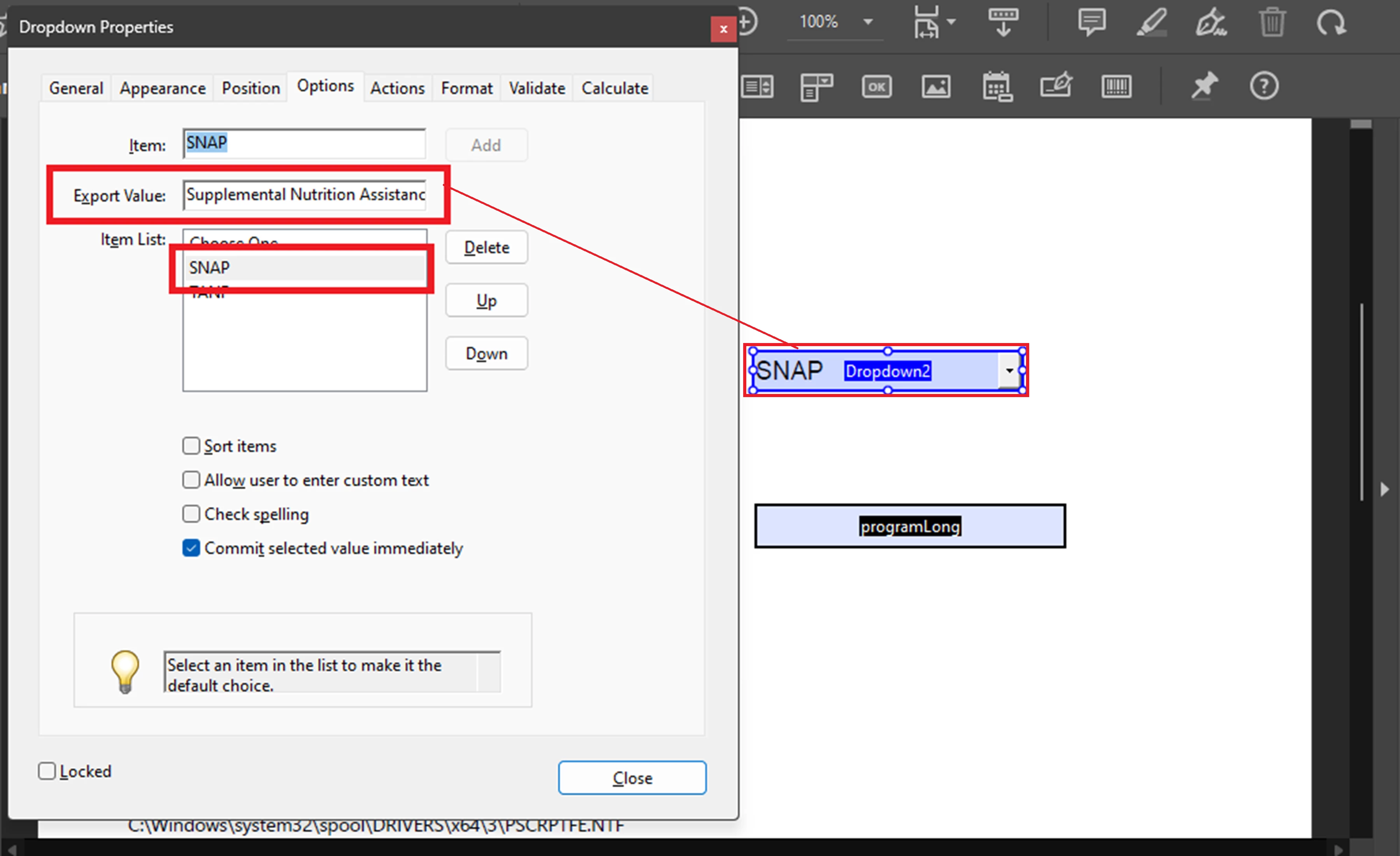
In this particular example, I am assuming that the users will not be able to type in any data in the "programLong field. In which case, you can keep that textfield as readonly. Therefore,  I am assigning to each item of the dropdown menu the long answer as the export value (illustrated in my screenshot below).


The Custom Calculating Script Script that I am using on "programLong" textfield :


var progValue = this.getField("Program").value;
(progValue == "Choose One")? event.value =="" : event.value = progValue


The script will execute as soon as the selection is commited in the dropdown field "Program", populating the "programLong"  textfield with the desired long answer (export value).


See screenshot:


1 reply

Participant
October 24, 2024

I have tried to place this script on a the calculated field on Program and programLong fields with no success.

ls_rbls
Community Expert
ls_rblsCommunity ExpertCorrect answer
Community Expert
October 24, 2024

+++EDITED REPLY... I made a mistake


Hi there @David38818339zr2v ,


Here is a working example using Acrobat's built-in features and one line of code employed as a Custom Calculating Script: https://acrobat.adobe.com/id/urn:aaid:sc:US:df02540b-5841-436a-963f-8d0cad6a5eab


In this particular example, I am assuming that the users will not be able to type in any data in the "programLong field. In which case, you can keep that textfield as readonly. Therefore,  I am assigning to each item of the dropdown menu the long answer as the export value (illustrated in my screenshot below).


The Custom Calculating Script Script that I am using on "programLong" textfield :


var progValue = this.getField("Program").value;
(progValue == "Choose One")? event.value =="" : event.value = progValue


The script will execute as soon as the selection is commited in the dropdown field "Program", populating the "programLong"  textfield with the desired long answer (export value).


See screenshot:


Participant
October 24, 2024

Nice and simply, I love it! Better than what I was trying to use.