
DJcohn
Participant
August 5, 2016
Answered

Setting a form field to auto fill based on another field

  • August 5, 2016
  • 20 replies
  • 151403 views

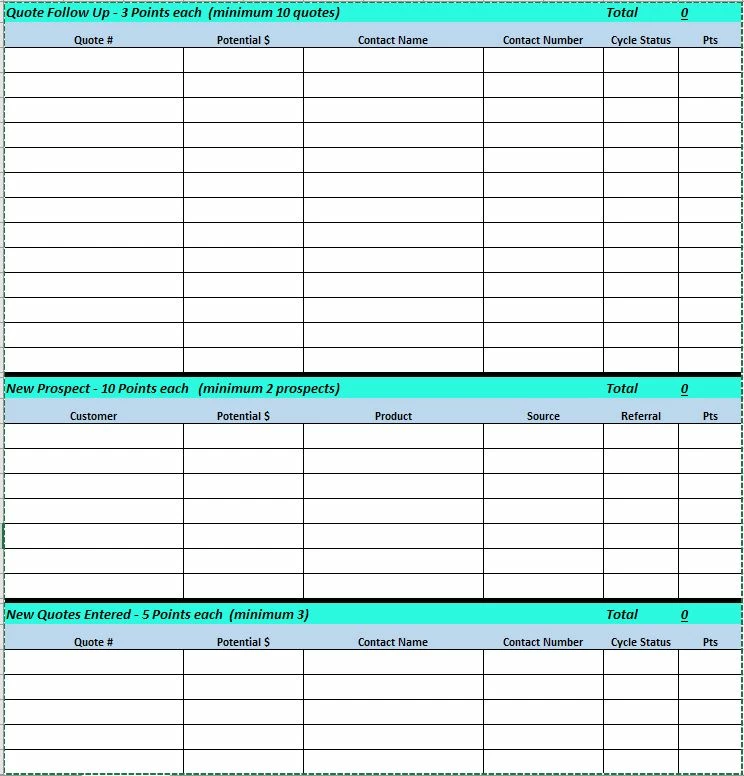
I am creating a scorecard to be used by my companies inside sales group.

I need to set the form so that if data is entered into one field, a specified number will automatically populate in another field.

Example:

IF a "Follow-Up Quote #" field is filled in THEN a 3 will automatically be entered in the corresponding "Pts" fiield

IF a "New Prospect - Customer" field is filled in THEN a 10 will automatically be entered in the corresponding "Pts" field

IF a "New Quote #" field is filled in THEN a 5 will automatically be entered in the correspondng "Pts" field

Sample Form below for visual
This topic has been closed for replies.
Correct answer try67

You can use something like this as the custom calculation script of the Pts field:

event.value = (this.getField("NameOfOtherField").valueAsString=="") ? "" : 3;

20 replies

Participant
February 1, 2021

Hi Guys,


i have a very similar question,


i am building a tree data collection app through fulcrum and i would really like a auto populate box for the following

Enter Botanical Name = Eucalyptus sp

Auto populate Common Name = Gum. 


is there anyway to bring two fields together to make them auto populate

Inspiring
December 3, 2020

Worked great for me.

Participant
April 13, 2020

Hi! 

in my form, based on the location value chosen from the dropdown titled "location" I want it to generate a specific email address in the "coordinator" field (for purposes of having the "submit" button generate a specific email address to send the form to based on what location is seleced). I'm a total noob so any siplified help would be awesome!!  


so if "Spain" is selected as location, I'd want xxxxxxx@gmail.com to generate in the coordinator field 

If "Prague" selected, I'd want possibly a different email to generate 

try67
Community Expert
Community Expert
April 13, 2020
Participant
July 12, 2019

I have a form used for status updates (law firm) where I'm trying to have one drop-down menu for which office the file is coming from (easy enough and already done)...Once chosen I need it to auto-fill the phone number for that specific selected office into another field.  In yet another field  I need another drop-down with all the employees in that specific office to populate and will be visible to select who is filling out the form.

The first part is easy, the other two I'm sure I can figure out over time but it seems like many of you are extremely knowledgeable and can help me quite a bit faster then me banging my head against the wall.

To clarify as well...I realize all of this can be done thru excel and then converted but was hoping to do it all thru the Prepare Form tab in Acrobat.  Thank you!

Thom Parker
Community Expert
Community Expert
July 18, 2019

Post this question to a new thread

Thom Parker - Software Developer at PDFScriptingUse the Acrobat JavaScript Reference early and often
Participant
June 20, 2019

I am creating a form where I simply need one text field to equal the Negative of another text field. I am not sure how to make this happen. Help.

Participant
May 15, 2019

Could someone help me with this. I have a .pdf form (using Adobe Acrobat Pro DC) that I created that has 7 checkboxes. I found the correct javascript to have other fields in the form to show or hide based on if the checkbox is checked or not. This document has two pages. The first page is set up more like a form; the second page is going to be used to generate a letter to a client. I would like to create text boxes that populate (page 2 - letter) based on what is checked in the checkmarks.

I have a checkbox one that when it is checked, it brings up 4 text boxes and a dropdown boxes for users to enter text in the text boxes and to choose 1 option from the drop down box. If the user checks checkbox 1, checkbox 2 and checkbox 3 and its corresponding text boxes or drop down boxes do not show on the form. The first half of the form consists of three check boxes and only one should be chosen. The second part of the form has 4 checkboxes and other boxes that the person can choose from more than one. I have managed to get the information to populate from page 1 to page 2 based on which check marks are chosen, but there may be a lot of wasted space in between those options (page 2) since some of the information doesn't need to populate over.

What I would like to do is have page 2 look more like a letter and have only the information that is checked from page 1 to flow over to page 2 (use text boxes that bring over information from the text boxes and dropdown boxes based on the checkmarks that are chosen. It doesn't matter that the 1st page has empty spaces between what is chosen, but since the 2nd page should look more like a letter, it does matter. Its ok for the first page to have dropdown boxes and checkboxes but the 2nd page should just have text boxes that are populated based on the fields chosen from the first page.

This is my javascript for the checkboxes to determine what other boxes get chosen on page 1.

var nHide = event.target.isBoxChecked(0)?display.visible:display.hidden;

this.getField("DD1").display = nHide;

this.getField("Text1").display = nHide;

this.getField("Text3").display = nHide;

this.getField("Text4").display = nHide;

var nHide = event.target.isBoxChecked(0)?display.hidden:display.visable;

this.getField("CB2").display = nHide;

this.getField ("Text5").display = nHide;

this.getField

("OR1").display = nHide;

this.getField ("CB2").display = nHide;

this.getField ("Text6").display = nHide;

this.getField ("OR2").display = nHide;

this.getField ("CB3").display = nHide;

this.getField ("Text7").display = nHide;

this.getField ("Text8").display = nHide;

That is working correctly.

Participant
April 25, 2019

Hi,

I have a similar question. I'm creating a form needed for bungalowparks, and I need a dropdown menu that shows the name of a park. I want the next text field to automatically state what the adress is of the park in the dropdown menu but I can't figure out how to do that. Can someone please explain?

Thanks in advance!

try67
Community Expert
Community Expert
April 25, 2019

Did you read this thread in full? The solutions provided here should be applicable to your situation as well.

December 12, 2018

I have a similar question with EllenBBC but the code doesn't seem to work for me. I have a field (Field 1) that auto calculates the sum of other fields. I would like to have a separate field that generates text according to the number in Field 1.

Field 1 will be calculated and the number can range from 0-40. I would like to text to be generated as

< 14 "Unsatisfactory"

15-22 "Below Requirement"

23-29 "Meets Requirements"

30-35 "Exceeds Requirements"

36-40 "Outstanding"

I tried to use answers above to modify it accordingly but it doesn't seem to work.

Thank you!

try67
Community Expert
Community Expert
December 12, 2018

Post the code you used, please.

December 12, 2018

var v = this.getField("Field 1").valueAsString; 

if (v=="") event.value = ""; 

else { 

    var score = Number(v); 

    if (score<14) event.value = "Unsatisfactory"; 

    else if (score>=15 && score<=22) event.value = "Below Requirements"; 

    else if (score>=23 && <=29) event.value = "Meets Requirement"; 

    else if (score>=30 && <=35) event.value = "Exceeds Requirement";

    else if (score>=36 && <=40) event.value = "Outstanding"

jenniferk69559934
Participant
October 26, 2018

Hi all!

I am creating a form and need to auto fill a field based on a selection in another field. For example: If I select the Common Name from a drop down list, I need the Botanical Name to auto fill.

Any help would be greatly appreciated!

try67
Community Expert
Community Expert
October 26, 2018
JainSa
Participant
October 24, 2018

Dear Experts,

Needed your help. above the table when the quantity value comes with 0 the column will be color on "red".

here how to write the script code based on the condition in Adobe LiveCycle designer form calc or javascript.