Participant
April 6, 2020
Answered

Setting for only showing one 'window'?

  • April 6, 2020
  • 1 reply
  • 296 views

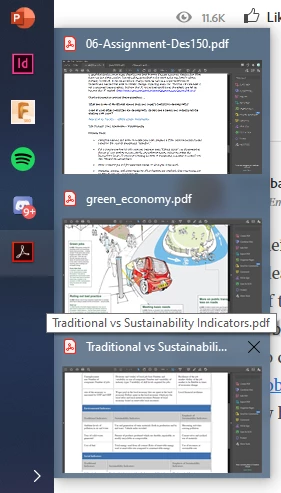
I an tirelessly annoyed of the multiple windows displayed when hovering over the taskbar icon for adobe acrobat. Individual tabs in an application do not need to be displayed! Is there a setting for removing this annoyance?


This topic has been closed for replies.
Correct answer ls_rbls

Hi,


If you're using Windows 10 go to Control Panel\System and Security\System and select "Advanced System settings"


You can also access system properties by right-clicking on "My Computer" desktop icon, then select Properties from the context menu.


Click next the "Advanced" tab and then "Settings" in the Performance section for "Visual effects, processor scheduling, memory usage, and virtual memory".


On the next dialogue box that will popup, you will be in the "Visual Effects" tab. In the list of items below, un-tick "Enable Peek" and click OK.


That should do. But it may be necessary for you to log out and log back in for the changes to take full effect.
1 reply

ls_rbls
Community Expert
ls_rblsCommunity ExpertCorrect answer
Community Expert
April 7, 2020

Hi,


If you're using Windows 10 go to Control Panel\System and Security\System and select "Advanced System settings"


You can also access system properties by right-clicking on "My Computer" desktop icon, then select Properties from the context menu.


Click next the "Advanced" tab and then "Settings" in the Performance section for "Visual effects, processor scheduling, memory usage, and virtual memory".


On the next dialogue box that will popup, you will be in the "Visual Effects" tab. In the list of items below, un-tick "Enable Peek" and click OK.


That should do. But it may be necessary for you to log out and log back in for the changes to take full effect.