
Participant
May 23, 2018
Answered

Setting Preferences in Acrobat Pro DC

  • May 23, 2018
  • 1 reply
  • 587 views

Hi there. I'm new here and have a question. I am creating a huge amount of internal links in several large documents. I have attached all of the appendices which I'm creating the links to. Right now, I need to also Edit each link after it's created, in order to choose "Open in New Window". Does anyone know of a way to change the preference so that the link will automatically open in a new window without having to do this extra step for each link?

Thanks for your thoughts on this.
This topic has been closed for replies.
Correct answer Adorobat

Hi Dz,

As per the issue description mentioned above, you want to set the preferences for internal links in the pdf, is that correct?

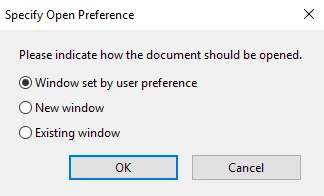
Go to Edit PDF  > select one of the links > right-click > Properties > Actions > under Actions > click on Open a file > Edit

Select the files > and select New Window.

Let us know if you need any help.

Shivam

1 reply

Adorobat
Community Manager
AdorobatCommunity ManagerCorrect answer
Community Manager
June 8, 2018

Hi Dz,

As per the issue description mentioned above, you want to set the preferences for internal links in the pdf, is that correct?

Go to Edit PDF  > select one of the links > right-click > Properties > Actions > under Actions > click on Open a file > Edit

Select the files > and select New Window.

Let us know if you need any help.

Shivam