


Participant
March 4, 2025
Answered

Setting Printer PDF Defaults

  • March 4, 2025
  • 1 reply
  • 877 views

Hi all.

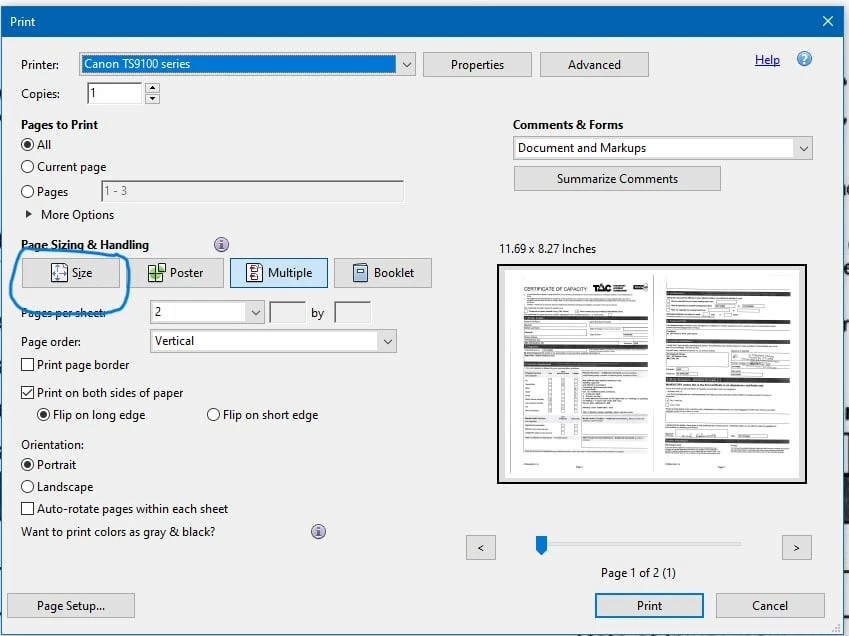
For some unknown reason, i've noticed lately that when trying to print a PDF, it prints a 2 page doc on 1 sheet.

Via a few headaches of trying to work it out, i discovered that i need to, under "page sizing and handling", change the default from "multiple" to "size".

Now the question is, how do i set that "size" option as a default, rather than having to remember to do it for each PDF i want to print ?

Any help would be hugeley welcomed.

Thank you
Correct answer david_6809

Hi Dave


Pleased to report that a reset of the printer seems to have done the job.

Thanks for your help.

Enjoy your day !


Dave

1 reply

creative explorer
Community Expert
Community Expert
March 5, 2025

@david_6809 right off the back, I can see the 'Pages per sheet' is '2'...which is what you are telling your printer. 

Instead, don't select 'multiple', click on 'Size' and it will print a whole page on one side, and flip to the back side and print the whole page on the back side. 

According to the manual, you may need to reset it:  https://ij.manual.canon/ij/webmanual/Manual/All/TS9100%20series/EN/UG/ug_o_03_03_19.html

m
Participant
March 5, 2025

Hi Dave.

Yes, i did work that part out, to change to "size", but i want to set that as a default.

It's getting late here now so will try the reset tomorrow and report back.

Thanks