
Answered
Shared pdf won't open in desktop Acrobat Pro from browser/online
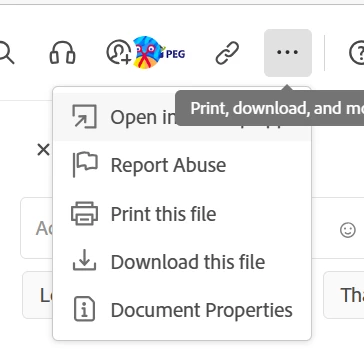
I have been sent a link to open a shared pdf. When I click on the link it takes me to Acrobat online and views the pdf in my web browser. When I click on the 'open in desktop app' it opens my installed version of Acrobat Pro (64 bit, on Windows 11 Pro) but a dialogue box comes up saying: "You do not have access to this feature. Please contact your IT admin for more details."
As I am my own IT admin I am at a loss! And don't know what is causing this. I need to download the pdf to my desktop so I have my own version to work from.
1. How do I solve this?
2. Is there another way to download a pdf to desktop from my browser other than hitting the 'open in desktop app' button?
Thanks.
 AdChoices