
Participating Frequently
February 21, 2018
Question

"Sheared" Helsinki font not printing correctly

  • February 21, 2018
  • 2 replies
  • 1225 views

Hi team,

So I'm using "Helsinki" regular (courtesy of Font squirrel) in an InDesign CC document. I've changed the shear angle to: -5° and tracking to: -40

(To counteract the natural slight italics and bring the font closer to vertical 90°)

-Note: I leave the font as is and don't convert to outlines.

I've exported a pdf using the "High Quality Print" setting. Viewing the pdf, the font appears to be fine i.e. at the angle I changed it to in Indesign.

See below what it looks like as pdf on my screen:

-I go to print with our office printer:

Konica/Minolta

bizhub C368

And it prints Helsinki with the original angle (not the -5° I gave it in InDesign) see below what it looks like when printed:

Short of converting text to outlines everytime, (I know that this works but I really don't want to have to do this each time), what else can I try?

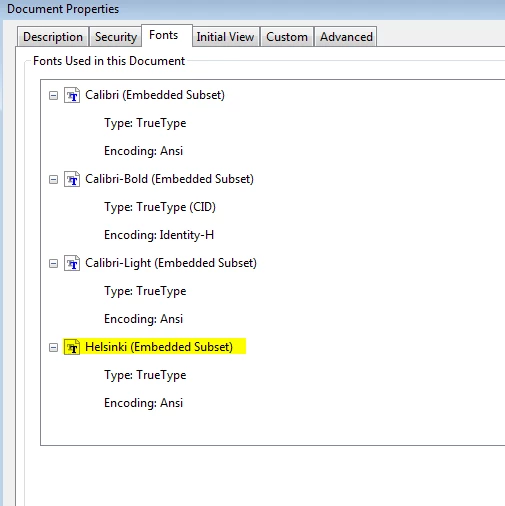
-I've checked that Helsinki is an embedded subset under the fonts tab to.
This topic has been closed for replies.

2 replies

Dov Isaacs
Legend
February 23, 2018

What happens if you try printing to some other printer? If not printing to a PostScript printer, it could be a printer driver or printer PDL issue.

          - Dov

- Dov Isaacs, former Adobe Principal Scientist (April 30, 1990 - May 30, 2021)
JosiahPAuthor
Participating Frequently
February 25, 2018

For some odd reason it has decided to print correctly now.

-I have no idea why it has apparently fixed itself but I've added a link to a test pdf anyway:

link to test pdf

I also tested it on another printer and it seems to be printing fine there.

The only thing different with the text is that I have changed the shear angle from -5° to -4°

Tracking has stayed the same.

Abambo
Community Expert
Community Expert
February 25, 2018

The link is your modified file or the one that does not print correctly?

ABAMBO | Hard- and Software Engineer | Photographer
Abambo
Community Expert
Community Expert
February 22, 2018

Try the print as image on the advanced tab of Acrobat. That's a work around not a solution. But it may avoid you having to vectorize.

How did you create the outline? In Indesign or Acrobat? If you used Indesign try-out the preflight option.

If with those 2 operations the print looks fine I would strongly suspect a printer driver problem.

You may also share a test file (PDF) with us so that we can print out on a different infrastructure.

ABAMBO | Hard- and Software Engineer | Photographer
JosiahPAuthor
Participating Frequently
February 22, 2018

Yea, I created the pdf with Indesign CC

-your second option of creating text to outlines with preflight in Acrobat Pro DC is what I used to get the font to print correctly.

-Sorry haven't had to do this before, but what is the best way to share the test pdf with you?

Abambo
Community Expert
Community Expert
February 23, 2018

You need to share it via a file sharing service like dropbox, wetransfer etc. You post here the link to the file. Just make sure that your test file does not contain sensitive or private data, as you are sharing to the world. I would create a file with dummy text. Just make sure that the problem still exists when ​you​ print the file to your standard printer.

ABAMBO | Hard- and Software Engineer | Photographer