

dkudler
Participating Frequently
July 1, 2022
Answered

Shifting margins of odd-numbered pages

  • July 1, 2022
  • 1 reply
  • 2478 views

I have a book that I uploaded to CreateSpace nearly a decade ago. We transfered it over to KDP Print, and it's been for sale with no problems.

Realized we had a newer PDF that hadn't been uploaded, so I need to update.

Unfortunately, KDP shows that the right-hand margin on about a dozen odd-numbered pages is now about a tenth of an millimeter over their outer margin limit:
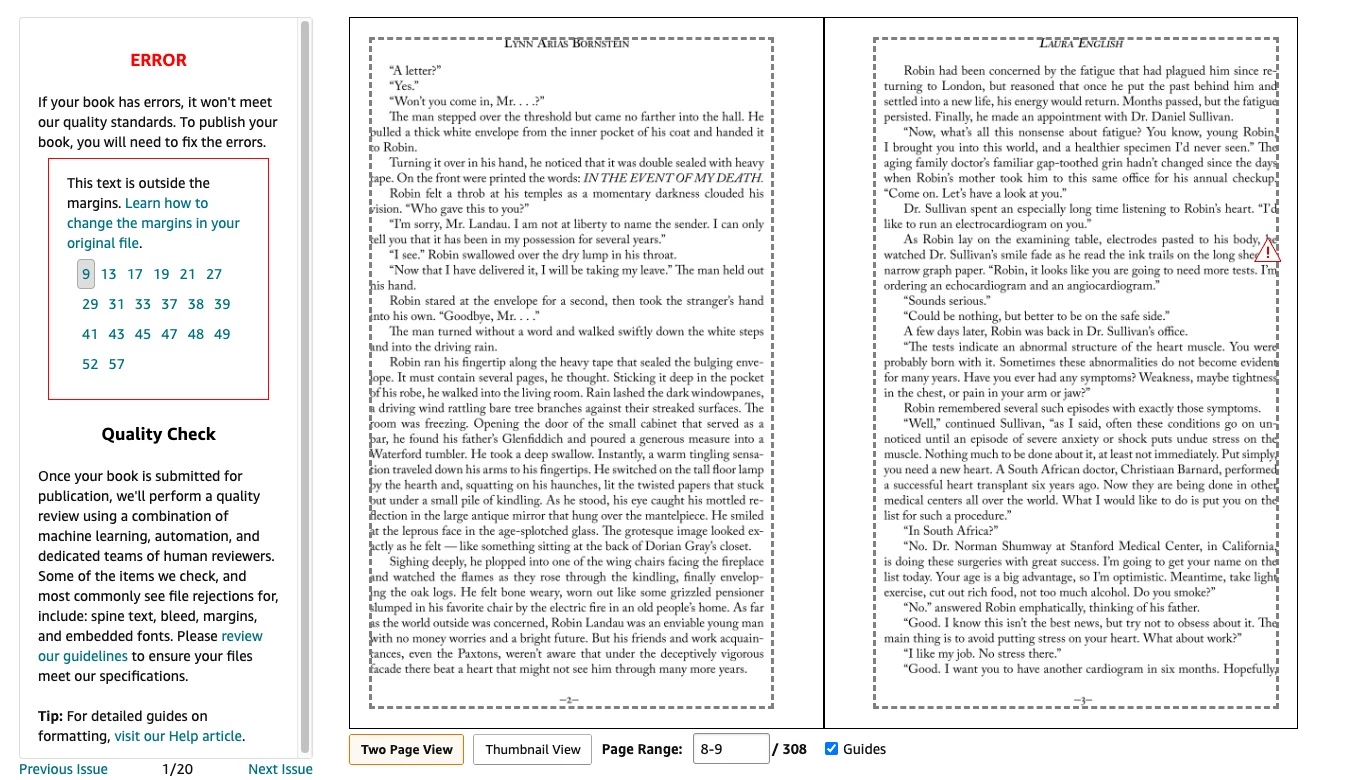
This was clearly a shift between the CS and KDP specs.

I could easily shift the pages in toward the gutter in InDesign. Unfortunately, I don't have the InDesign file for the latest changes (which were made years ago). 

So what I'd like to do is use Acrobat to shift the print area toward the gutter.

I tried to use the Crop tool — and I can subtract from the left-hand margin of odd-numbered pages easily. But I can't figure out how to add to the right-hand margin, so I end up with a page that's no longer the right size.

Help?
This topic has been closed for replies.
Correct answer J E L

Hi @dkudler, If it's only a few pages, and you don't mind doing it manually, you could use Edit PDF. Select all the paragraphs on that page, holding the Shift key as you select each one so all the text is selected as one "box" and then nudge the page in towards the margin with an exact arrow key tap. You probably only need one or two.


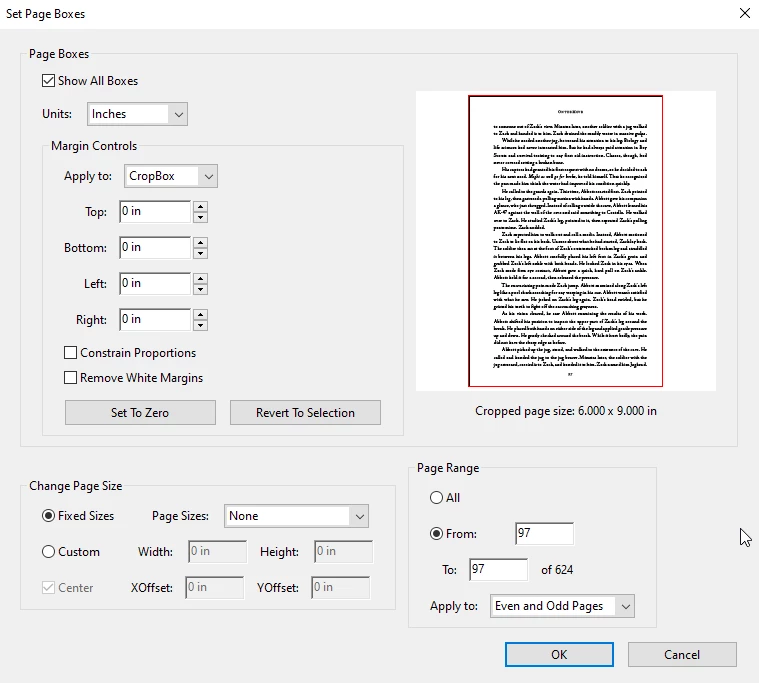
There are better (more exact) ways of doing it, perhaps with View > Tools > Print Production > Set Page Boxes, and other users may come along with instructions for you if needed. Hope that's helpful. (I'm using Acrobat Pro DC Version 2022.001.20117.)


1 reply

J E L
Community Expert
J E LCommunity ExpertCorrect answer
Community Expert
July 2, 2022

Hi @dkudler, If it's only a few pages, and you don't mind doing it manually, you could use Edit PDF. Select all the paragraphs on that page, holding the Shift key as you select each one so all the text is selected as one "box" and then nudge the page in towards the margin with an exact arrow key tap. You probably only need one or two.


There are better (more exact) ways of doing it, perhaps with View > Tools > Print Production > Set Page Boxes, and other users may come along with instructions for you if needed. Hope that's helpful. (I'm using Acrobat Pro DC Version 2022.001.20117.)


dkudler
dkudlerAuthor
Participating Frequently
July 2, 2022

Ah, perfect! Of course, I had to figure out how to turn on the Print Production tools

Once I'd done that, I just used the Change Page Size XOffset field to move the print boxes .06" toward the gutter. (The XOffset field allows for negative numbers!)

The whole thing took about five minutes — once I'd figured out how to do it.

Thank so much for your help!

J E L
Community Expert
Community Expert
July 3, 2022

Terrific! So glad I could help. I've never used that feature before but it's great to know that it will take negative increments!