

Participant
September 3, 2025
Answered

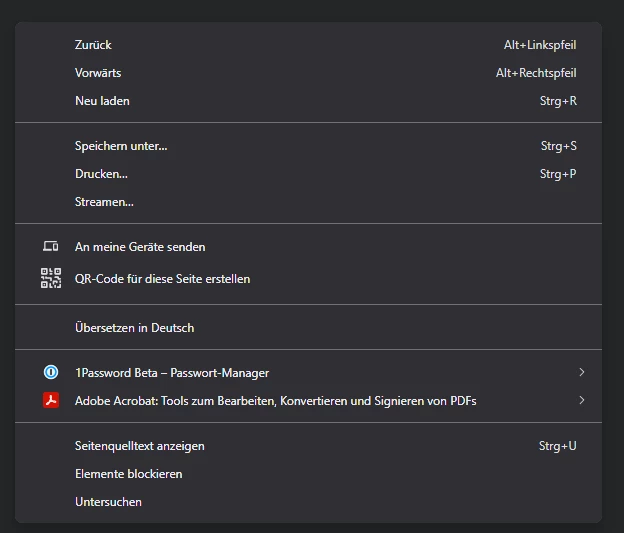
Shorten Chrome/Brave right click menu text
  • September 3, 2025
  • 1 reply
  • 151 views

One Chromium based browsers, right click menu text is too long. How can I make it shorter? Just Adobe Acrobat, or Acrobat is enough instead of this long text.

Correct answer Amal.

Hi there,


Hope you are doing well and thanks for reaching out.


The right-click context menu options you’re seeing in Chromium-based browsers (like Chrome or Edge) are set by the browser when Acrobat’s extension is installed. At the moment, the text labels can’t be customized or shortened to just “Acrobat” or “Adobe Acrobat.”


If you’d prefer a simpler label, you may share this as a feature request directly with our product team. You can do this through the link https://adobe.ly/3JCXFuy 


~Amal

1 reply

Amal.
Amal.Correct answer
Legend
September 3, 2025

Hi there,


Hope you are doing well and thanks for reaching out.


The right-click context menu options you’re seeing in Chromium-based browsers (like Chrome or Edge) are set by the browser when Acrobat’s extension is installed. At the moment, the text labels can’t be customized or shortened to just “Acrobat” or “Adobe Acrobat.”


If you’d prefer a simpler label, you may share this as a feature request directly with our product team. You can do this through the link https://adobe.ly/3JCXFuy 


~Amal