
Participant
May 26, 2025
Question

Show and Hide fields in pdf Form

  • May 26, 2025
  • 2 replies
  • 691 views

Hello


I would like to be able to just show the next fields after clicking to fill in the top row.
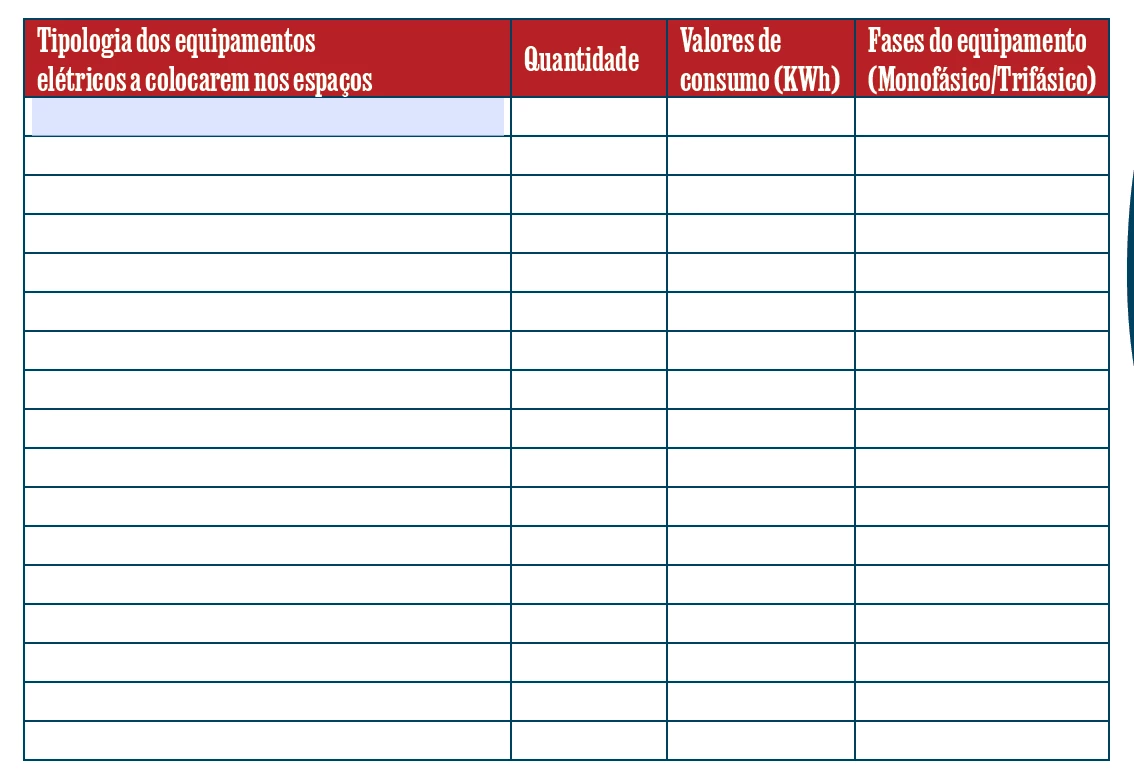
 

Ex: When clicking on the first cell, the fields appear: "column.B.1", "column.C.1", "column.D.1", "column.A.2" (first field of the 2nd row);


I would like to make it so that the code used is always the same in column.A.

Something like this, when clicking on column.A.1 of ("column.A.__"+1), it showed the cell column.A.2.

Is it possible with array? And how to do it?

And it will be possible to do something like "column.[B-D].1", is it possible to do this?


Hugo Vieira da Silva


2 replies

Nesa Nurani
Community Expert
Community Expert
May 27, 2025

If you just want to show fields, you can use the built in action to show/hide fields.

Or if you want a script, you can use something like this as 'On Focus' action of field "column.A.1":

this.getField("column.B.1").display = display.visible;
this.getField("column.C.1").display = display.visible;
this.getField("column.D.1").display = display.visible;
this.getField("column.A.2").display = display.visible;

You can use another script as 'On Blur' action if field is left empty to hide fields.

For another row use script in A2 just change field names.
If you need something else pleace try to describe what exactly you looking for.


Thom Parker
Community Expert
Community Expert
May 26, 2025

What do you mean by show?  The fields are already invisible unless highlighting is turned on. 

Do you mean that you don't want the user to be able to enter data in the other fields in the row, unless text is entered into the first column of the row? 

If so, then a better stategy would be to use a validation script on the first field in each row to test the field for an empty string. 

And yes, the same script can be used for all rows if it is well written. 


Here's an article on showing and hiding fields. The same technique would also work for enabling/disabling the fields using the readonly property.  

https://www.pdfscripting.com/public/Hiding-and-Showing-Form-Fields.cfm


Thom Parker - Software Developer at PDFScriptingUse the Acrobat JavaScript Reference early and often
:ugoAuthor
Participant
May 27, 2025

Good morning,


I've been looking at this page and I haven't been able to do anything. And believe me, I've tried without asking and reading everything that appeared on the web, but I can't.


Can you teach me?


Hugo Vieira da Silva

Thom Parker
Community Expert
Community Expert
May 27, 2025

In order to help you, we need to understand your requirements. Please tell us what you hope to achieve. What is the high level behavior on the form? What to you want the users to experience?  


Thom Parker - Software Developer at PDFScriptingUse the Acrobat JavaScript Reference early and often