


Fritz Hansen
Inspiring
September 25, 2025
Answered

Show Tabs for all open PDFs

  • September 25, 2025
  • 1 reply
  • 212 views

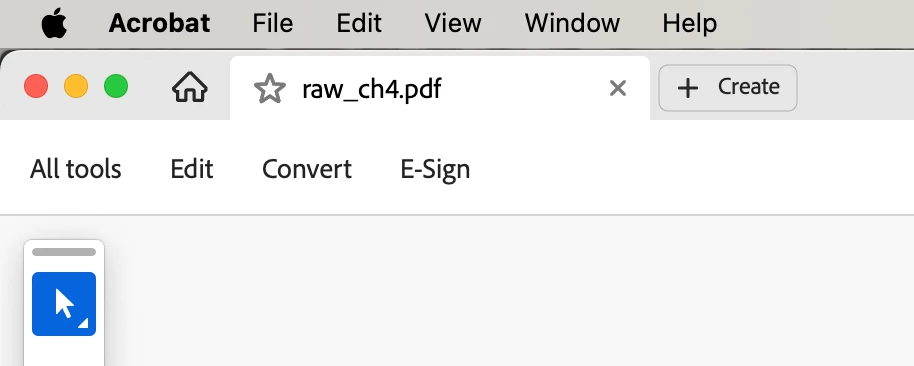
Is there a way to show tabs for all open PDFs? If I have more than one PDF open in Acrobat, there's only one tab showing, the one for the PDF currently being viewed. What's the point of having tabs if they don't all show—like in InDesign, Illustrator, Photoshop, etc. 


There is one tab for the currently visible PDF. I have to go to the Window menu to select a different PDF that is also open. Seems like I should be able to just click on that other PDF's tab, so I assume there's a way to show all tabs. Can anyone direct me to how to do that?  Thanks
 

Correct answer Meenakshi_Negi

Hi Fritz Hansen,


Thank you for reaching out, and sorry about the trouble caused.


It seems that all the PDFs are opening in the new window, and that is the reason you see only one tab for the file. Please ensure that the option is marked "Open document as new tabs in same window" In the application preferences. Check the screenshot below for reference:


Feel free to let us know if you need any help.


Thanks,

Meenakshi


1 reply

Meenakshi_Negi
Meenakshi_NegiCorrect answer
Legend
September 25, 2025

Hi Fritz Hansen,


Thank you for reaching out, and sorry about the trouble caused.


It seems that all the PDFs are opening in the new window, and that is the reason you see only one tab for the file. Please ensure that the option is marked "Open document as new tabs in same window" In the application preferences. Check the screenshot below for reference:


Feel free to let us know if you need any help.


Thanks,

Meenakshi


Fritz Hansen
Inspiring
September 25, 2025

Thank you! That did it.
