
Participant
July 8, 2020
Answered

Sign quality

  • July 8, 2020
  • 3 replies
  • 1067 views

Hi, 

I have a problem with sign quality. 

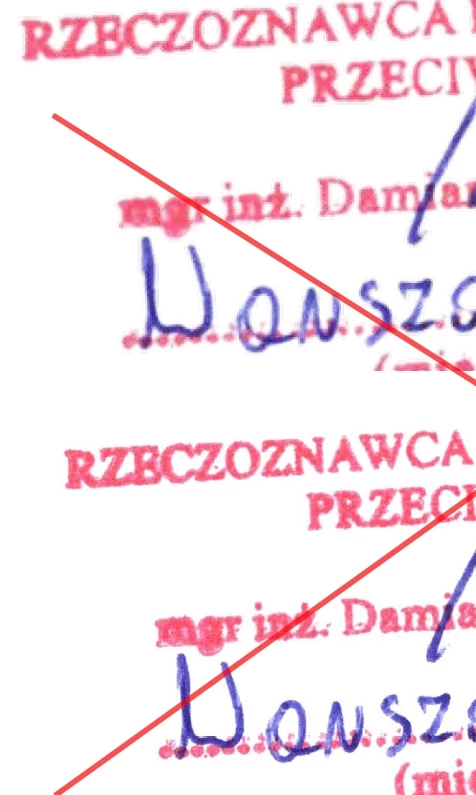
When I use sign utility, quality is bad, and looks very poor on printed vesion. 

When I use stamp utility, quality is perfect but picture file is not transparent. Background is white. 


Maybe there is a possibility increase sign quality?

UP sign - this is "sign utility"

down sign - stamp utlility


This topic has been closed for replies.
Correct answer swapnilsrivastava
 

Hi There,


Thanks for reporting the issue here.

Adobe Sign can be used as to sign any document; and the quality of the sign is determined by the quality of the digital document.
For instance, if one creates a Word file with an empty sign field and create a PDF using Adobe Acrobat PDFMaker Add-In then the PDF would be of higher quality and when used Adobe Sign to add signature in the field, then they would be of higher quality as compared to a lowly scanned document or any third party app used to create the same.

And accordingly print quality would be better and lower.


Please do let us know, if anything is required from our end.


Regards,
Swapnil Srivastava

3 replies

swapnilsrivastava
Community Manager
swapnilsrivastavaCommunity ManagerCorrect answer
Community Manager
July 9, 2020
 

Hi There,


Thanks for reporting the issue here.

Adobe Sign can be used as to sign any document; and the quality of the sign is determined by the quality of the digital document.
For instance, if one creates a Word file with an empty sign field and create a PDF using Adobe Acrobat PDFMaker Add-In then the PDF would be of higher quality and when used Adobe Sign to add signature in the field, then they would be of higher quality as compared to a lowly scanned document or any third party app used to create the same.

And accordingly print quality would be better and lower.


Please do let us know, if anything is required from our end.


Regards,
Swapnil Srivastava

Thom Parker
Community Expert
Community Expert
July 8, 2020

Here is a tool designed specifically for creating signature images. It not only removes the background but creates a graded transparency on the edges, so the signature blends perfectly into the background.

https://www.pdfscripting.com/public/PDF-Signature-Stamps.cfm


Thom Parker - Software Developer at PDFScriptingUse the Acrobat JavaScript Reference early and often
ls_rbls
Community Expert
Community Expert
July 8, 2020

If you have an image manipulation program, such as Adobe Photoshop, Illustrator, or other similar programs, you can easily remove the white background.


However, newer versions of MS Office , specifically , Micrososft Word allows you to remove the white background image too.


Check if your current version of MS Word permits removing the white beackground .


If it does, use this Micrososft Support guidance as reference: https://support.microsoft.com/en-us/office/remove-the-background-of-a-picture-c0819a62-6844-4190-8d67-6fb1713a12bf#:~:text=removed%20the%20background.-,Select%20the%20picture%20that%20you%20want%20to%20remove%20the%20background,Adjust%20group%2C%20select%20Remove%20Background.

damian336Author
Participant
July 8, 2020

Thank you, 


But "stamp utility" allways have white backgrond, even picture is transparent (PNG). 

Bernd Alheit
Community Expert
Community Expert
July 8, 2020

How have you created the image?