
Signature error
Adobe Reader DC:
Continuous Version: 2018.009.20050
File Version: 18.009.20050.57426
Core Version: 18.2304
SO Windows 10 64 bits
We have problems signing PDF documents when the PKCS # 7 format is established and leaving the "Include signature revocation status" option unchecked as shown in the image.
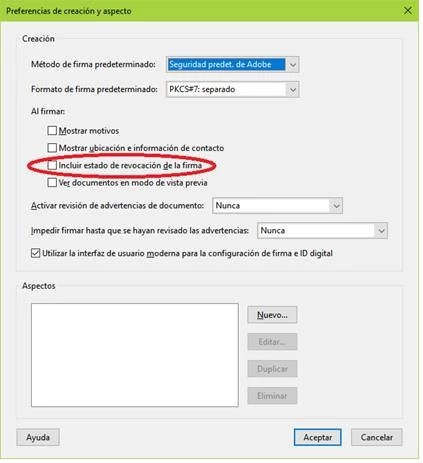
Indicate that if the option "Include signature revocation status" is checked, then the signature and validation is done correctly, it is also correctly signed if the CAdES format is used instead of the PKCS # 7 format.
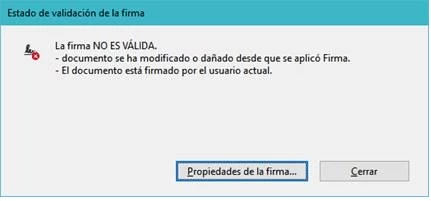
The problem arises when the signature is made through a CSP (Cryptographic Service Provider) that is not Microsoft's, through the logs of the CSP it is observed that the Acrobat Reader application establishes multiple hashes and finally requests the signature, but the result is that in the validation process of the signature it is indicated that the document has been modified, as it appears in the following image.
We have observed in the logs of the CSP, that when the signature and the validation are done correctly, only a single hash is established to sign and nevertheless when the validation is not correct during the signature process, the Acrobat Reader application establishes multiple hashes in the CSP.
This problem is presented with the latest version of Acrobat Reader DC, however using the version of Acrobat Reader 11 the signature is made in such a way that the subsequent validation is done correctly.
 AdChoices