
Participant
June 16, 2025
Question

Signature form tool replaced

  • June 16, 2025
  • 1 reply
  • 309 views

First my Acrobat subscription seems to have changed from the Pro version to the Continuous update version.  Then ,the normal signature form tool was removed and replaced with a different icon that does not function like the old signature tool.  Since we must use ECA certificates this change puts me dead in the water..


Any way I can get back the old signature tool as shown below?
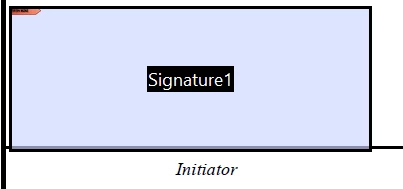


instead of 
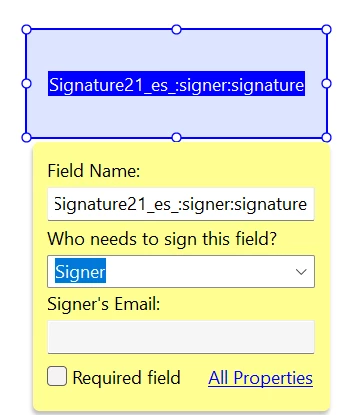


1 reply

Legend
June 16, 2025

Hi @Jim6C1418070177


Thank you for reaching out. You are getting this because you created a normal PDF form; you need to create an "e-signing" form. 
When you click on the Create form tool > click on the three dots menu, and choose "Prepare Form for e-signing"  as shown in the screenshot attached.


Let us know how it works.


~Tariq

Participant
June 16, 2025

It was not clear that checking the "This form requires signatures" would create a very different type of Acrobat document.

I never checked that box before.  However, today I tried it and thought it would just place the digital signature field where it should.  I never realized the impact of that decision would be to replace the digital signing tools available!!!

try67
Community Expert
Community Expert
June 17, 2025

It affects a lot more than that, unfortunately... It also disables most of the types of scripts you can apply to your fields (Calculation, Validation, etc.), and yes, it's very unclear that it has that effect on the file, and how to reverse it. Very bad UX design on Adobe's side.