Answered
signature panel icon
Hello,
Can someone please explain what would be the difference between the two icons on the signature panel on a pdf signed document?

vs

What is with the small "i" icon?
Thank you!

Hello,
Can someone please explain what would be the difference between the two icons on the signature panel on a pdf signed document?
vs
What is with the small "i" icon?
Thank you!
In short: Both icons imply that you have an approval signature with a positive identity check. In the former case permitted, signed changes exist, in the latter case the document is unchanged.
Please take a look at the following cheat sheet for the symbols in general:
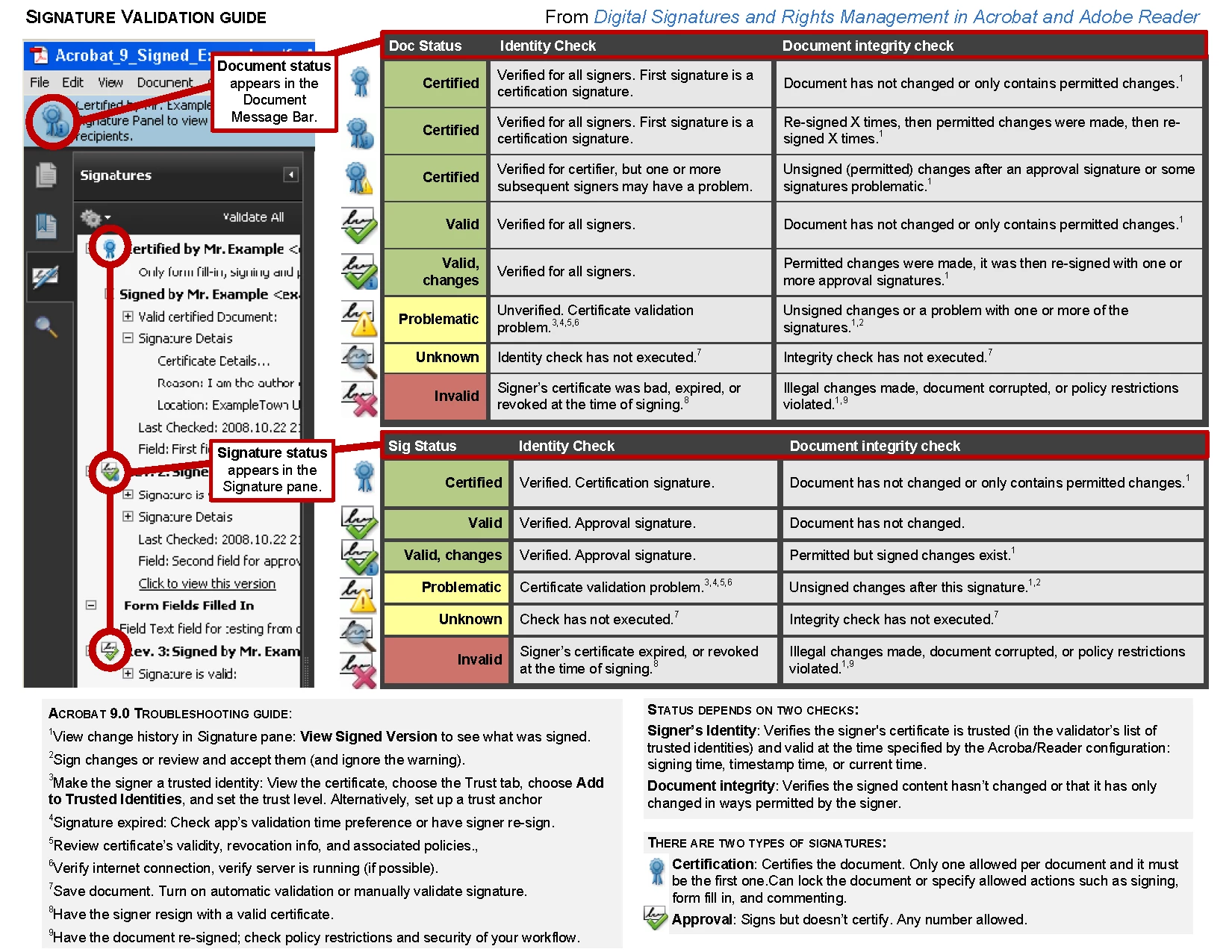
(This cheat sheet is for Adobe Acrobat and Reader 9; meanwhile some icons have slightly changed in design.)
Already have an account? Login
No account yet? Create an account
Enter your E-mail address. We'll send you an e-mail with instructions to reset your password.


 AdChoices