Inspiring
July 6, 2026
Answered

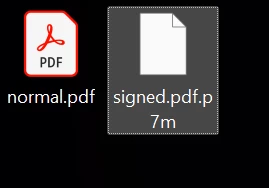
signed pdf are displayed with no icon in windows 11 24h2

  • July 6, 2026
  • 2 replies
  • 37 views

it has been 3 weeks since this and i tried everything to fix this, even edit registry key to retrieve the old icon with the lock. I can’t set an adobe icon for signed pdf. tried repairing and reinstalling, with multiple pc. i use adobe acrobat pro dc x64


    Correct answer Michael++Klink

    It’s great that you found a way to show icons as you desired.

    One word of warning, though: Acrobat does not explicitly support PDFs in p7m envelopes.

    For Acrobat such files are PDF files with some leading and some trailing trash bytes. It tolerates a certain amount of such trash bytes around the PDFs by searching the actual start and end of the PDF inside the file. If there are too many trash bytes before or after, though, it doesn’t locate them, assumes a seriously broken PDF, and applies generic PDF repair. While this kind of repair often succeeds to recover the original PDF, it sometimes fails and results in a PDF that displays differently from the original one.

    Thus, opening *.pdf.p7m directly with Acrobat may be acceptable practice for a quick first look (e.g. to determine whether it is the right kind of document) but if you want to look up specific data in it, you should extract the actual PDF from the p7m envelope and view that extracted PDF.


    2 replies

    Inspiring
    July 13, 2026

    RESOLVED, since adobe does not have an icon for this aparently, i made the icon myself. rename the file in .ico and used filetypesman to assign it to the .p7m filetype, now i can open it with adobe and distinguish the pdf files


    Michael++Klink
    Michael++KlinkCorrect answer
    Participating Frequently
    July 13, 2026

    It’s great that you found a way to show icons as you desired.

    One word of warning, though: Acrobat does not explicitly support PDFs in p7m envelopes.

    For Acrobat such files are PDF files with some leading and some trailing trash bytes. It tolerates a certain amount of such trash bytes around the PDFs by searching the actual start and end of the PDF inside the file. If there are too many trash bytes before or after, though, it doesn’t locate them, assumes a seriously broken PDF, and applies generic PDF repair. While this kind of repair often succeeds to recover the original PDF, it sometimes fails and results in a PDF that displays differently from the original one.

    Thus, opening *.pdf.p7m directly with Acrobat may be acceptable practice for a quick first look (e.g. to determine whether it is the right kind of document) but if you want to look up specific data in it, you should extract the actual PDF from the p7m envelope and view that extracted PDF.

    Inspiring
    July 13, 2026

    Thx! I will do this!

    Michael++Klink
    Participating Frequently
    July 6, 2026

    Which application is associated with the p7m extension on your computer? You ought to configure that application and its icon for associated files.

    Inspiring
    July 6, 2026

    They are associated and automatically open with Adobe Acrobat pro DC.

    Is a problem born with the Adobe/Windows update.

    Michael++Klink
    Participating Frequently
    July 6, 2026

    While associating p7m with Acrobat might work for displaying some signed *.pdf.p7m files, this appears more like a life hack and not like something Acrobat setup does by itself. But I might also simply have missed some new Acrobat feature here.