
Participant
October 10, 2019
Question

Signed Tab Does not Appear in Signature Field Properties Window of Acrobat Pro DC

  • October 10, 2019
  • 1 reply
  • 4223 views

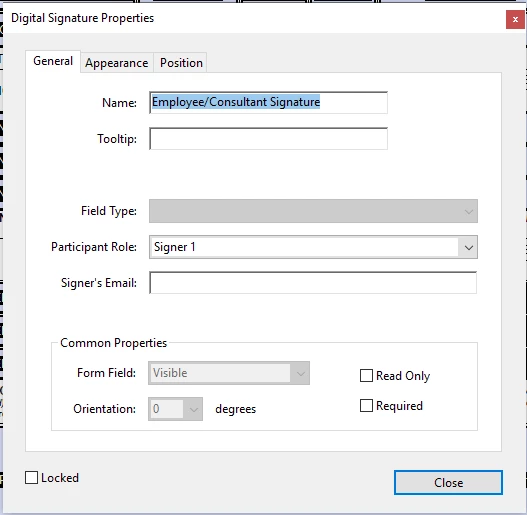
I am trying to create a fillable form in Acrobat Pro DC on a PC and have converted the document into a fillable form and I have entered a digital signature field.  I would like to lock editing of all the text fields once it is signed but when I open the signature field properties the Signed tab does not appear so I am unable to assign any post-signature limitations.  Can someone help? 


The properties window that I see is pasted below: 
    1 reply

    Bernd Alheit
    Community Expert
    Community Expert
    October 10, 2019

    Want you use Adobe Sign?

    Participant
    October 10, 2019
    If I understand Adobe Sign correctly, it kind of works like Docusign in that you fill out the form and when you're ready to have it signed, you send it using Adobe Sign. However, this will not work for me. I have to create a fillable form as a template that gets sent to our consultants to fill out and sign. No one signs the form when it is first sent out. Once it's signed by the consultant, it gets sent to our project managers who make sure the information is correct. Once it's finalized, the PM needs to send it to a final reviewer who signs it and the document should get locked at that point. To use Adobe Sign wouldn't the consultants have to have Adobe Sign? If so, that's not going to work.
    Bernd Alheit
    Community Expert
    Community Expert
    October 10, 2019
    Why does you create a Adobe Sign form?