
Participating Frequently
May 12, 2025
Question

Signing PDF document asks for "Smart Card"

  • May 12, 2025
  • 1 reply
  • 1176 views

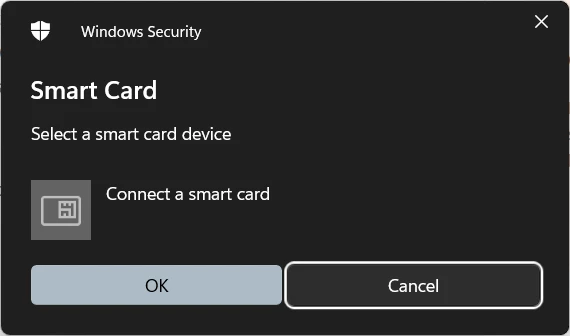
I want to sign a PDF document with my digital certificate (.p12). When I click "Sign", Windows (11 Pro) prompts me to connect a smart card. I have no idea what that is and do not own one. Signing worked fine before I enabled Windows Hello on my device. Disabling it and restarting the app does not change the behavior. The certificate works in other apps and all information is up to date.


I would like to simply sign the document with my certificate just like before.


1 reply

Community Manager
May 12, 2025

Hi there,


Thanks for bringing this up. I know it can be confusing when Acrobat suddenly prompts for a smart card or digital ID when trying to sign a document.


Why You’re Seeing the Smart Card Prompt:

Acrobat is likely set to use a certificate-based digital signature, and it’s trying to access a hardware-based digital ID, such as a smart card or USB token, that it expects to be connected to your machine.


This happens when:

  • A digital signature field is configured to require a certificate.

  • Acrobat detects that your system has previously used a smart card or token-based certificate (even if it’s no longer connected).

  • Or, the default digital ID in Acrobat preferences is pointing to a certificate that requires smart card authentication.


Alternatively:


If you don’t want to use a smart card or digital certificate, and just need to apply a simple signature or type/draw a signature, follow these steps:


1. Use “Fill & Sign” instead of a signature field:

  • Open the PDF in Acrobat.

  • Go to Tools > Fill & Sign.

  • Use the Sign option to type, draw, or insert an image of your signature — no smart card needed!


2. Clear saved digital IDs (if unwanted):

  • Go to Edit > Preferences > Signatures.

  • Under Identities & Trusted Certificates, click More…

  • Review and remove any old or unused certificates that reference smart cards.


3. Check the signature field type:

  • If the PDF was created by someone else and contains a certificate-based signature field, you may need to ask them to provide a version that allows for Fill & Sign instead.


~Tariq

just-eroAuthor
Participating Frequently
May 12, 2025

Thanks Tariq. Unfortunately I couldn't find a satisfying solution in your answer.

I do want to use my certificate. I simply do not want to be prompted with a smart card pop-up.


The certificate does not require smart card authentication.

I have previously only connected a physical security key (YubiKey). I don't know whether Acrobat considers that a "smart card" or "token-based certificate". In any case; inserting the YubiKey does not change anything.