


Participant
October 5, 2025
Question

signing PDF File in Acrobat using Digital Certificate

  • October 5, 2025
  • 2 replies
  • 218 views

Dear All, i need your help, Topic: signing PDF File in Acrobat using Digital Certificate.


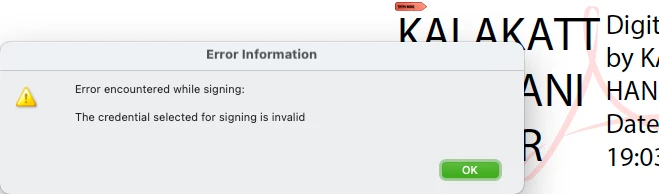
Signing with Digital Certificate doesn't work; and it always give me: the Credential selected for signing is invalid.
 

2 replies

hani_HFKAuthor
Participant
October 7, 2025

Dear Creative Explorer,

Thank you for your help and support.

I followed the steps as you sent me; unfortunately it didn't work. Same problem persists; it says [The credential selected for signing is invalid].

Attached is my Digital ID and Trusted Certificate as it is registered in Adobe Acrobat ... it seems all good; but i can't sign digitally or Certify any PDF file (even plain text letter).  


I hope you have another approach that might help me.

Best Regards

creative explorer
Community Expert
Community Expert
October 6, 2025

@hani_HFK To resolve the issue, open Adobe Acrobat and navigate to Edit > Preferences > Signatures. Under the Verification section, click on More, then locate and uncheck the option labeled “Require certificate revocation checking to succeed whenever possible.” Once you've made this change, click OK to save your settings and try signing the document again.

Also, make sure you're using a Document Signing Certificate, not an S/MIME or email certificate. Acrobat requires specific key usages and policies for document signing. And Install any available updates and restart Acrobat

m
hani_HFKAuthor
Participant
October 7, 2025