Known Participant
June 25, 2018
Answered

Signing Signature Fields in Reader DC

  • June 25, 2018
  • 1 reply
  • 679 views

I create PDF documents that need to be digitally signed by a number of people. The signatures do not need to be visible.

I use Acrobat 7 Pro to created the documents and add signature fields for invisible signatures. Those who need to sign, open the PDF in Reader to do so.

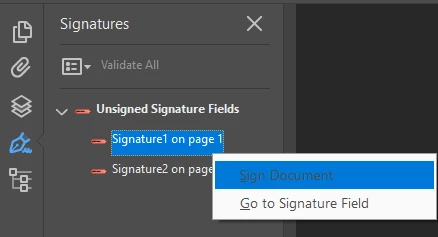
In Reader XI there is a signature pane on the left, listing all of the signature fields. To sign, users right click on the appropriate signature field, select Sign Document, enter their password, and save.

Now some users have upgraded to Reader DC and the signature pane is gone. How does one sign a signature field in Reader DC?

Thanks

This topic has been closed for replies.
Correct answer Adorobat

Hi YossiD,

As per the issue description mentioned above, you want to know the signature pane location in Reader DC using which users can sign the pdf, is that correct?

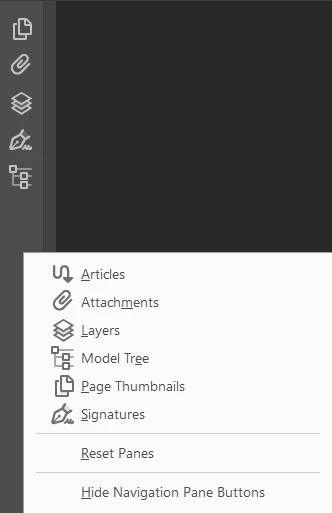
Users can locate the signature pane in Reader DC by clicking the "small rectangle" in the middle of the page >  right-clicking the navigation pane, select Signatures. (below are the screenshots)

Let us know if you need any help.

Shivam

1 reply

Adorobat
AdorobatCorrect answer
Participating Frequently
June 25, 2018

Hi YossiD,

As per the issue description mentioned above, you want to know the signature pane location in Reader DC using which users can sign the pdf, is that correct?

Users can locate the signature pane in Reader DC by clicking the "small rectangle" in the middle of the page >  right-clicking the navigation pane, select Signatures. (below are the screenshots)

Let us know if you need any help.

Shivam